
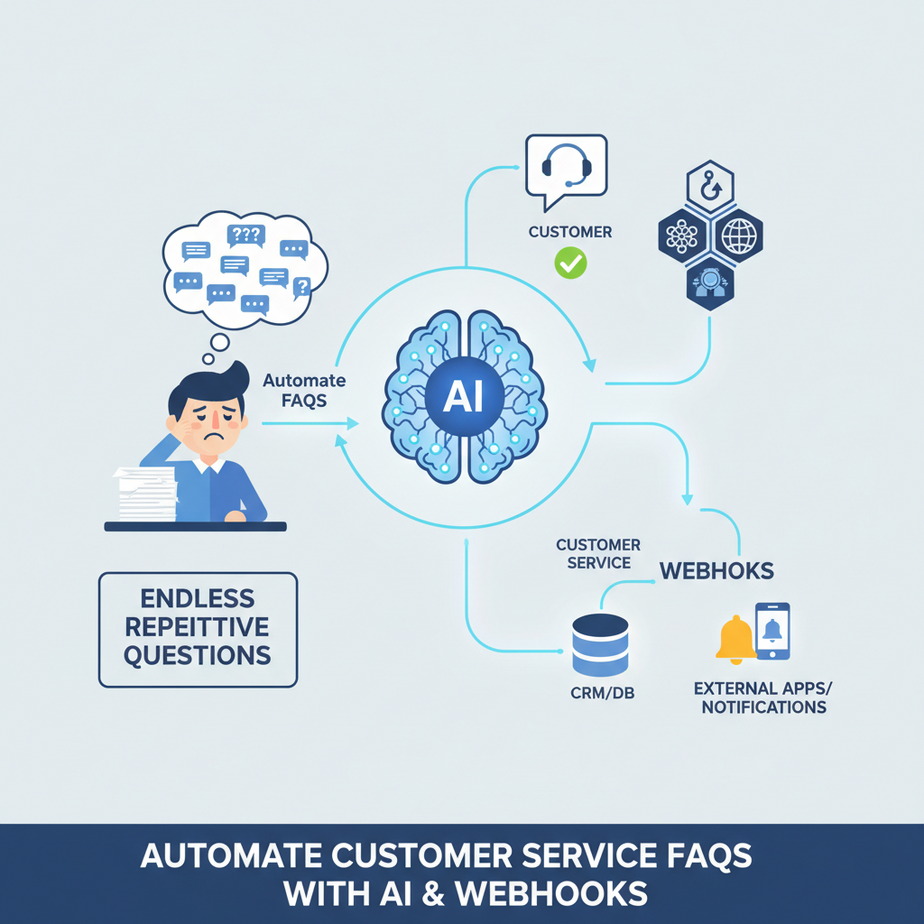
The Case of the Endless Repetitive Questions
Remember that poor intern? The one who spent 8 hours a day, five days a week, typing out the same 5 answers to the same 5 questions? Bless their cotton socks. “Yes, we ship to Antarctica.” “No, we don’t accept Dogecoin (yet).” “Your order is… still processing.” It was a soul-crushing job, a digital Groundhog Day of monotonous replies.
Or maybe you were that intern. Or you’re the business owner, drowning in DMs and emails, wishing you had an army of tiny, super-efficient robots who could just handle it.
Well, buckle up. Today, we’re building that robot army. Or, at least, its very first, very smart, very polite general.
Why This Matters (Or, How to Stop Bleeding Time & Money)
Let’s be brutally honest. Every time you or an employee answers a frequently asked question, two things happen:
- You spend time. Time that could be used closing a sale, strategizing a marketing campaign, or, heaven forbid, enjoying a coffee.
- You spend money. Because time is money, especially when you’re paying someone to answer questions even a parrot could learn.
This automation isn’t just about freeing up an intern (though they’ll thank you). It’s about:
- Instant Customer Gratification: No more waiting. Customers get answers immediately, even at 3 AM.
- Scaling Support Without Scaling Headcount: Handle 100 questions or 100,000 with the same setup.
- Empowering Your Team: Your human team can focus on complex, high-value problems, not trivial FAQs.
- Saving Your Sanity: No more repetitive strain injury on your typing fingers.
We’re turning a manual, reactive mess into a proactive, intelligent system. We’re replacing chaos with calm. We’re replacing that poor intern with a diligent, tireless AI assistant.
What This Tool / Workflow Actually Is
At its core, this automation is a simple but powerful loop:
- Something happens (a customer asks a question, sends an email, fills a form).
- A “digital tripwire” (a webhook) catches that event and sends the question somewhere.
- A super-smart AI brain (a Large Language Model, or LLM) reads the question, consults its internal knowledge, and generates an answer.
- The answer is sent back to the customer, or to your team for a quick review.
What it DOES:
- Listen for incoming questions from various sources.
- Route those questions to an AI for processing.
- Generate accurate, polite, and contextual answers to common questions.
- Deliver those answers back to the customer or an internal system.
What it DOES NOT do (yet):
- Read your mind. You still need to tell the AI what kind of business it is and what kind of answers to give.
- Handle extremely complex, multi-step customer service issues (e.g., processing a refund that requires multiple system checks).
- Replace human empathy and nuance for sensitive situations (that’s for another lesson, my friend).
- Spontaneously write a novel about shipping logistics.
Prerequisites (Don’t Panic, It’s Easier Than Building IKEA Furniture)
You don’t need a computer science degree. You don’t need to know how to code beyond copy-pasting. What you do need:
- An Internet Connection: Obviously.
- An AI API Key: We’ll use a general AI service (like OpenAI, but the principles apply to others). Many offer free tiers or very low costs to start. Just sign up and get your API key.
- An Automation Platform Account: Zapier or Make (formerly Integromat). Both have generous free tiers perfect for learning. These are our digital glue.
- A Text Editor: Notepad, VS Code, whatever you use. Just in case you want to peek at some code snippets.
- A Sprinkling of Curiosity: And the willingness to click a few buttons. You’ve got this.
Step-by-Step Tutorial: Building Your FAQ Robot
Let’s get our hands dirty. We’ll build this in a generic automation platform (like Zapier/Make) and interact with a generic AI API.
1. Get Your AI API Key
Sign up for an AI platform (e.g., OpenAI, Google AI Studio, Anthropic). Navigate to their API section and generate an API key. Treat this key like your toothbrush: don’t share it, and change it regularly.
2. Set Up Your Automation Platform (Zapier/Make)
Login to Zapier or Make. Create a new “Zap” (Zapier) or “Scenario” (Make).
3. The Trigger: Catching the Question (Webhook)
This is how your automation knows a question has arrived. We’ll use a ‘Webhook’ as our trigger.
In Zapier:
- Choose ‘Webhooks by Zapier’ as your Trigger App.
- Select ‘Catch Hook’ as the Trigger Event.
- Zapier will give you a unique URL. Copy this URL. This is where you’ll send your customer’s questions from whatever system they originate (e.g., a contact form, a chatbot, an email parser).
- Test the trigger by sending some sample data to that URL. For instance, open a new browser tab and go to:
YOUR_WEBHOOK_URL?question=What+are+your+shipping+costs%3F
In Make:
- Add a module and search for ‘Webhooks’.
- Select ‘Custom Webhook’.
- Click ‘Add a hook’ and give it a name. Make will generate a URL. Copy this URL.
- Test it similarly by sending a sample question to the URL.
4. The Action: Sending the Question to AI
Now that your automation has caught the question, it needs to send it to the AI for an answer.
We’ll use an ‘HTTP’ or ‘Webhooks’ action to send a POST request to your AI API.
In Zapier:
- Add an Action Step. Search for ‘Webhooks by Zapier’.
- Select ‘POST’ as the Action Event.
- Set the URL to your AI’s chat completion endpoint (e.g.,
https://api.openai.com/v1/chat/completions). - Set the ‘Headers’:
Content-Type: application/json Authorization: Bearer YOUR_AI_API_KEY - Set the ‘Data Pass-Through?’ to ‘No’.
- Set the ‘Payload Type’ to ‘Json’.
- For ‘Data’, construct your JSON body. This is where you tell the AI what to do. Replace
{{1__question}}with the actual question caught by your webhook trigger.{ "model": "gpt-3.5-turbo", "messages": [ {"role": "system", "content": "You are a friendly and helpful customer service assistant for Professor Ajay's AI Automation Academy. You answer questions about courses, enrollment, and automation. Keep answers concise and professional. If you don't know the answer, politely state that you cannot answer that specific question and suggest visiting our website or contacting support."}, {"role": "user", "content": "{{1__question}}"} ], "max_tokens": 150, "temperature": 0.7 } - Test this step. You should get a response from the AI.
In Make (similar, using an HTTP module):
- Add an ‘HTTP’ module after your webhook.
- Select ‘Make a request’.
- Method: ‘POST’.
- URL: Your AI’s chat completion endpoint.
- Headers: Add two items:
Content-Typewith valueapplication/json, andAuthorizationwith valueBearer YOUR_AI_API_KEY. - Body Type: ‘Raw’. Content Type: ‘JSON (application/json)’.
- Request Content: Construct your JSON body, mapping the question from your webhook module.
{ "model": "gpt-3.5-turbo", "messages": [ {"role": "system", "content": "You are a friendly and helpful customer service assistant for Professor Ajay's AI Automation Academy. You answer questions about courses, enrollment, and automation. Keep answers concise and professional. If you don't know the answer, politely state that you cannot answer that specific question and suggest visiting our website or contacting support."}, {"role": "user", "content": "{{[Webhook].question}}"} ], "max_tokens": 150, "temperature": 0.7 } - Test the module.
5. The Final Step: Delivering the AI’s Answer
Now you have the AI’s answer. What do you do with it? Send it back to the customer, post it to a Slack channel for review, update a CRM, etc. For simplicity, let’s assume we’re sending it back via email or to an internal chat.
In Zapier/Make:
- Add a new Action Step.
- Choose your desired app (e.g., Gmail, Slack, your CRM).
- Map the AI’s response (e.g.,
choices[0].message.contentfrom the previous step’s output) to the message body. - If sending an email, map the original sender’s email (if available from your webhook trigger) to the ‘To’ field.
- Test and publish your automation.
Complete Automation Example: FAQ Bot for Your Online Course
Let’s say you run an online course business. Customers constantly ask: “What’s included in the ‘AI Basics’ course?” or “Do you offer payment plans?”
Here’s how this plays out:
- Customer Action: A potential student visits your website, goes to the ‘Contact Us’ page, and fills out a simple form asking, “What’s the refund policy for the Data Alchemy course?”
- Webhook Trigger: Your contact form (e.g., Typeform, Google Forms, custom form) is configured to send a webhook POST request to your Zapier/Make URL whenever a new submission comes in. The `question` field in the webhook body contains the student’s query.
- AI Processing: Zapier/Make catches this webhook. It then takes the student’s question and sends it to the AI API with a system prompt like: “You are a helpful assistant for Data Alchemy Courses. Provide clear, concise answers based on the following course policies: [insert your actual refund policy text here]. If the question is not covered, ask them to visit the website’s FAQ page.”
- AI Response: The AI processes the question against the provided policy and replies, “Our refund policy for the Data Alchemy course allows for a full refund within 14 days of enrollment, provided you have completed less than 20% of the course material. For more details, please visit our website’s FAQ page.”
- Answer Delivery: Zapier/Make then takes this AI-generated answer and either:
- Sends an automated email directly to the student.
- Posts the question and answer to a dedicated Slack channel for your support team to review before it’s sent to the student (a “human-in-the-loop” approach, which is often wise for initial rollouts).
- Updates a field in your CRM (e.g., HubSpot, Salesforce) with the question and the AI’s proposed answer.
The student gets an instant, accurate answer. Your team doesn’t lift a finger for this common question. Efficiency, my friends, glorious efficiency!
Real Business Use Cases (Beyond Just FAQs)
This core automation pattern (Webhook -> AI -> Action) is a superpower. Here are 5 ways businesses can wield it:
-
E-commerce Store: Auto-reply to shipping questions
Problem: Customers constantly ask “Where’s my order?” or “Do you ship internationally?”
Solution: A webhook from your order tracking system (or contact form) sends the order ID/question to the AI. The AI, with access to a shipping policy or even integrated with a tracking API (more advanced, but possible!), provides an instant status update or policy explanation. This frees up customer service reps to handle returns or complex product inquiries.
-
SaaS Company: Basic Technical Support Triage
Problem: Many support tickets are for common password resets or “how-to” questions that have simple solutions in the knowledge base.
Solution: Intercept incoming support emails/chats via a webhook. Send the user’s query to the AI, which is prompted with your knowledge base articles. The AI can then provide a direct link to the solution or a step-by-step guide. Only complex, novel issues get escalated to human support.
-
Real Estate Agent: Property Information Hotline
Problem: Potential buyers frequently call or message asking about specific property features, school districts, or open house times.
Solution: A dedicated phone number or text line triggers a webhook when a query comes in. The AI is fed property details from your CRM/listing platform. It can instantly answer questions like “How many bedrooms does 123 Main Street have?” or “When is the next open house?” freeing the agent to close deals.
-
Consulting Firm: Pre-Qualification & Service Explanation
Problem: Leads often ask vague questions about services, pricing, or the consultation process, requiring manual explanation.
Solution: When a new lead fills out a “request a consultation” form, a webhook sends their initial query to the AI. The AI provides standardized information about your service tiers, pricing models, or what to expect from the first call. This pre-qualifies leads and ensures they arrive at the sales call better informed.
-
Event Management: Event Detail Enquiries
Problem: Attendees repeatedly ask about parking, accessibility, agenda times, or speaker bios for an upcoming event.
Solution: Connect your event registration platform (via webhook) to the AI. The AI, fed with the event agenda and FAQ, can answer detailed questions instantly. “Where’s the nearest parking?” “What time is the keynote speaker?” Imagine the relief for your event staff!
Common Mistakes & Gotchas (Don’t Be That Guy)
- Garbage In, Garbage Out: If your input question is unclear or you don’t give the AI enough context (that ‘system’ prompt is critical!), you’ll get garbage answers. Be specific in your prompts.
- Forgetting the ‘System’ Prompt: Just sending a question to the AI is like asking a stranger for directions without telling them where you are. The ‘system’ prompt sets the stage: who the AI is, what its role is, and what kind of tone/answers to give.
- Infinite Loops: Be careful not to set up an automation where the AI’s response triggers another webhook back to the AI. Your credit card will scream.
- Exposing API Keys: NEVER hardcode your API key directly in publicly accessible code or web pages. Always use environment variables or your automation platform’s secure key storage.
- Lack of Testing: Don’t just build it and walk away. Test with various questions – easy, hard, out-of-scope – to see how your AI performs.
- Over-Reliance on AI: Remember, AI is a tool. It’s fantastic for automating repetitive tasks, but it’s not a sentient being. For sensitive or unique issues, a human touch is still paramount.
How This Fits Into a Bigger Automation System
Today, you’ve built a single, powerful automation. But this is just one brick in your automated empire. Think bigger:
- CRM Integration: Log every AI interaction in your CRM. If a human agent ever takes over, they have full context. This AI can even pre-fill lead information.
- Email Marketing Personalization: The AI can analyze question patterns to inform your email segmentation or even draft personalized follow-ups.
- Voice Agents: The text output from our AI can be fed into Text-to-Speech (TTS) systems, turning your FAQ bot into a basic voice agent for phone support.
- Multi-Agent Workflows: For complex questions, this AI can be the first line of defense. If it can’t answer, it can trigger another AI agent focused on, say, lead qualification, or escalate to a human.
- RAG Systems (Retrieval Augmented Generation): We briefly touched on providing context to the AI. In future lessons, we’ll dive into how to dynamically feed the AI relevant documents (like your entire knowledge base) so it can answer truly complex, niche questions without “hallucinating.” This is where things get seriously powerful.
What to Learn Next (Don’t Stop Now, The Robots Need You!)
Congratulations! You’ve successfully built your first intelligent FAQ automation. You’ve saved yourself time, saved your business money, and (most importantly) saved an imaginary intern from a life of repetitive typing.
But this is just the beginning. Next time, we’ll tackle the art of making your AI truly knowledgeable. We’ll explore how to feed it vast amounts of your specific business data – documents, manuals, spreadsheets – so it stops guessing and starts knowing. We’re talking about upgrading your AI from a smart consultant to a walking, talking library of your entire business. Stay tuned, because the robots are just getting started, and so are you.





