
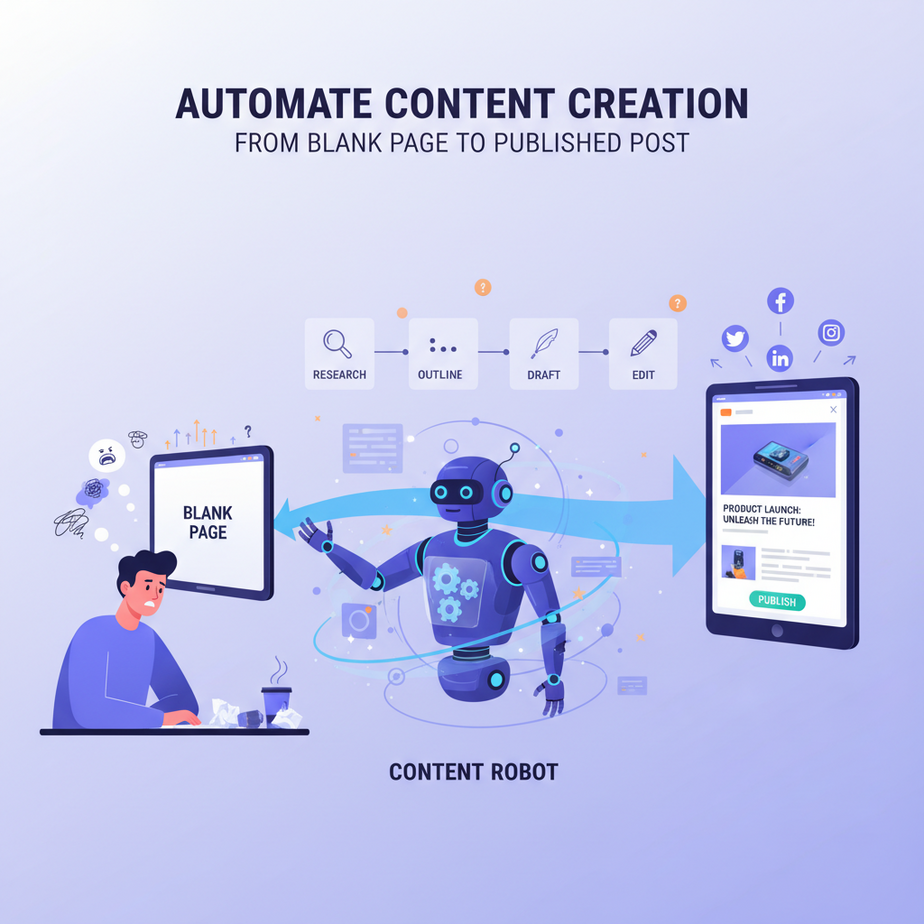
The Dreaded Blank Page and the Rise of the Content Robot
Ah, the blank page. It sits there, mocking you, radiating pure, unadulterated judgment. You’ve got a product launch next week, and you need a snappy social media campaign. A new feature just dropped, and your sales team needs an email blast. Oh, and don’t forget the weekly blog post that magically writes itself, right?
If you’re in marketing, sales, or running any kind of business, you know the drill. Content is king, queen, and the entire royal court. But creating it? That’s the dragon you have to slay every single day. The ideas run dry, the words get repetitive, and the sheer volume needed to keep up with the digital world feels impossible.
Many a marketer has dreamed of a tireless, creative assistant who could churn out drafts, brainstorm ideas, and adapt content for every platform. Well, my friends, that dream is no longer a fantasy. It’s here, and it’s powered by AI.
Today, we’re going to build your very own content robot. Not one that replaces your brilliant human insights, but one that eliminates the grunt work, conquers writer’s block, and lets your creative team focus on strategy and refinement, not staring at a blinking cursor.
Why This Matters: Fueling Your Business with Content at Scale
Let’s cut to the chase. Why should you care about automating content generation?
-
Speed to Market: Launching a new product or campaign? You need content *now*. AI dramatically reduces the time from idea to draft, letting you react faster and seize opportunities.
-
Scale Your Output: One human can write so much. An AI can generate dozens of variations, hundreds of ideas, or multiple content pieces simultaneously. Imagine covering every social platform, every email segment, every blog topic without breaking a sweat.
-
Banish Writer’s Block: AI provides an endless stream of starting points. No more staring at a blank page. Get a draft, then refine it with your human touch. It’s a creativity kickstart on demand.
-
Cost Efficiency: While not a direct replacement for experienced writers, AI can significantly reduce the need for junior copywriters for routine tasks, freeing up your senior talent for high-value strategic work.
-
Consistency & Personalization: Maintain a consistent brand voice across all content, and even personalize messages at scale, tailoring an email to individual customer segments far more efficiently than manual efforts.
This automation upgrades the work of marketing teams, sales teams, and even internal communications, turning slow, manual drafting into a swift, scalable operation.
What This Tool / Workflow Actually Is: Your Digital Content Co-Pilot
At its heart, this workflow uses a Large Language Model (LLM) – like the ones from OpenAI – as an incredibly versatile content engine. You give it instructions and context (a "prompt"), and it generates text that fits your criteria. It’s like having a writing assistant that never sleeps, never complains, and can write in dozens of different styles and tones.
What it DOES:
- Generate initial drafts for articles, emails, social media posts, ad copy.
- Brainstorm ideas and headlines.
- Rewrite existing content in different tones or lengths.
- Summarize long texts into short, punchy copy.
- Translate or adapt content for different audiences.
What it DOES NOT do (or isn’t great at YET):
- Conduct original, deep research or fact-checking on its own (it draws from its training data, which has a cut-off).
- Develop truly novel, groundbreaking creative concepts that require complex human empathy and strategic thinking.
- Understand subtle nuances of human humor or irony perfectly without very specific instructions.
- Replace a human editor or strategist. Its output always needs review and refinement.
Essentially, we’re turning a general-purpose AI into your specialized content factory.
Prerequisites: Your Workshop for Content Creation
Ready to build this thing? Here’s what you’ll need:
-
An OpenAI API Key: Yes, again! It’s the engine for almost all our automations. Get one from platform.openai.com.
-
A text editor: For writing our prompts and (optionally) a tiny Python script.
-
A basic understanding of your target audience and brand voice: The AI is only as good as your instructions. Knowing *who* you’re writing for and *how* your brand speaks is crucial.
-
A critical eye: You’re the editor-in-chief. The AI is the first-draft writer.
Step-by-Step Tutorial: Giving Your Robot its Voice
Step 1: Get Your OpenAI API Key (Again!)
If you skipped the last lesson, go to platform.openai.com, sign up, set up billing, and generate your API key. Keep it under lock and key. We’ll use YOUR_OPENAI_API_KEY.
Step 2: Define Your Content Goal
Before you even talk to the AI, know what you want. A blog post title? Five social media updates? A sales email? Be specific.
For this example, let’s aim to generate three distinct social media posts from a given blog post summary.
Step 3: Craft Your System Prompt (The Content Robot’s Persona)
This is where you tell the AI its role, its tone, and its output format. We want it to be a professional marketer, understand social media best practices, and return clean JSON.
You are an expert social media manager and content creator for a B2B SaaS company called "CloudFlow". Your task is to generate compelling social media posts based on the provided content summary. Each post should be engaging, include relevant emojis, and a clear call to action (CTA). Focus on the benefits for businesses.

Return the posts as a JSON array of objects, with each object having a 'platform' (e.g., 'LinkedIn', 'Twitter', 'Instagram') and 'text' field.

Example Output Format:
[
  {
    "platform": "LinkedIn",
    "text": "Your LinkedIn post text here"
  },
  {
    "platform": "Twitter",
    "text": "Your Twitter post text here"
  }
]
See how specific we are? We gave it a persona, a goal, stylistic rules (emojis, CTA), and a strict output format.
Step 4: Provide the Input Content (What to Write About)
This is the raw material. Let’s use a summary of a hypothetical blog post about automating customer support.
Blog Post Summary:
This blog post discusses how AI-powered chatbots can automate up to 70% of routine customer support queries. It highlights benefits like 24/7 availability, reduced wait times, and significant cost savings for businesses, freeing up human agents for complex issues. It's for small to medium businesses struggling with support volume.
Step 5: Make the API Call (Python Example)
Time to send our instructions and content to the AI. This Python script will connect to OpenAI, send our prompts, and print the generated social media posts.
import openai
import os
import json

# --- Configuration (replace with your actual key) ---
# For this example, we'll set it directly.
# In a real app, use environment variables (e.g., os.getenv("OPENAI_API_KEY"))
openai.api_key = "YOUR_OPENAI_API_KEY"

# --- Your System Prompt ---
system_prompt_content = """
You are an expert social media manager and content creator for a B2B SaaS company called "CloudFlow". Your task is to generate compelling social media posts based on the provided content summary. Each post should be engaging, include relevant emojis, and a clear call to action (CTA). Focus on the benefits for businesses.

Return the posts as a JSON array of objects, with each object having a 'platform' (e.g., 'LinkedIn', 'Twitter', 'Instagram') and 'text' field. Create 3 distinct posts.

Example Output Format:
[
  {
    "platform": "LinkedIn",
    "text": "Your LinkedIn post text here"
  },
  {
    "platform": "Twitter",
    "text": "Your Twitter post text here"
  }
]
"""

# --- The Input Content ---
user_content_summary = """
Blog Post Summary:
This blog post discusses how AI-powered chatbots can automate up to 70% of routine customer support queries. It highlights benefits like 24/7 availability, reduced wait times, and significant cost savings for businesses, freeing up human agents for complex issues. It's for small to medium businesses struggling with support volume.
"""

# --- Make the API Call ---
try:
    response = openai.chat.completions.create(
        model="gpt-3.5-turbo-0125", # Or "gpt-4-turbo" for higher quality/cost
        response_format={ "type": "json_object" }, # Crucial for structured output!
        messages=[
            {"role": "system", "content": system_prompt_content},
            {"role": "user", "content": user_content_summary}
        ]
    )

    # Parse the JSON response
    generated_posts = json.loads(response.choices[0].message.content)
    print(json.dumps(generated_posts, indent=2))

except openai.APIError as e:
    print(f"OpenAI API Error: {e}")
except Exception as e:
    print(f"An unexpected error occurred: {e}")
Remember to install the OpenAI library first: pip install openai
Step 6: Review the Output (Your Robot’s First Draft)
Here’s what our little content robot might spit out:
[
  {
    "platform": "LinkedIn",
    "text": "Struggling with high customer support volume? 😫 Discover how AI-powered chatbots can automate up to 70% of routine queries, offering 24/7 availability and slashing wait times. Free up your human agents for critical issues and watch your business save big! #CustomerSupport #AIAutomation #CloudFlow #BusinessEfficiency Learn more: [LinkToBlog]"
  },
  {
    "platform": "Twitter",
    "text": "🚀 Boost your customer support! AI chatbots from CloudFlow can automate 70% of queries, provide 24/7 service, & cut costs. Let your team focus on complex issues! #AI #SupportAutomation [LinkToBlog]"
  },
  {
    "platform": "Instagram",
    "text": "Tired of endless customer support queues? 😤 Imagine 24/7 automated help, happier customers, and significant cost savings! Our latest blog post reveals how AI chatbots are transforming support for SMBs. Tap the link in bio to read more! #AIforBusiness #CustomerService #TechSolutions #CloudFlow ✨ [LinkToBlog]"
  }
]
Pretty neat, right? Three distinct posts, tailored for different platforms, with emojis and CTAs. Ready for a quick human review, adding actual links, and then scheduling!
Complete Automation Example: Blog Post to Social Media Queue
Let’s take this from a script to a fully automated pipeline. Imagine you’re publishing a new blog post weekly, and you want social media posts automatically generated and added to your scheduling tool.
We’ll use a hypothetical scenario involving a blog’s RSS feed, OpenAI, and a social media scheduler like Buffer or Hootsuite (which often have Zapier/Make integrations).
-
Trigger: New Blog Post Published
* Use a tool like Zapier or Make.com. Set a trigger: "When a New Item Appears in RSS Feed" (pointing to your blog’s feed).
* This will grab the new blog post’s title, URL, and potentially a summary. -
Action 1 (Optional but Recommended): Summarize Blog Content with AI
* If your RSS feed doesn’t provide a good summary, you can add another OpenAI step here. Feed the full blog post text (fetched via its URL) to the AI with a prompt like: "Summarize this blog post into 150 words, focusing on key benefits."
* This ensures the input for your social media posts is always concise and relevant. -
Action 2: Generate Social Media Posts with AI
* Take the summary from Step 1 (or the RSS feed’s summary).
* Pass it to the OpenAI API using the exact system prompt from our tutorial (Step 3).
* Crucially, ensure theresponse_format={ "type": "json_object" }is set in the OpenAI module of your no-code tool. -
Action 3: Parse and Iterate Through AI Output
* The OpenAI response will be a JSON array of posts. Most no-code tools have an "Iterator" or "Loop" function to process each item in an array.
* For each post in the JSON array, you’ll extract itsplatformandtext. -
Action 4: Add to Social Media Scheduler
* For each extracted post, use an action like "Add Post to Buffer" or "Schedule Post in Hootsuite".
* Map thetextfield to the post content and theplatformfield to the desired social network. You might need conditional logic here (e.g., if platform is "LinkedIn" use the LinkedIn integration).
Result: Every time you hit "publish" on a new blog post, your automation springs to life, generates multiple tailored social media updates, and queues them up in your scheduler, ready for your final approval. This is your content factory running on autopilot.
Real Business Use Cases: Beyond Social Media
This content generation superpower isn’t limited to social media. Think broader!
-
E-commerce Store (Product Descriptions):
* Problem: Manually writing unique, SEO-friendly descriptions for hundreds or thousands of products is a monumental task.
* Solution: Feed product specifications (color, size, material, features) to the AI. It generates multiple description variations, optimized for different keywords or tones, which are then pushed to the e-commerce platform. -
SaaS Company (Sales & Onboarding Emails):
* Problem: Crafting personalized email sequences for different user segments or sales stages is time-consuming.
* Solution: Based on user data (e.g., "signed up for X feature," "didn’t complete Y tutorial"), AI generates personalized email drafts, complete with relevant CTAs, for sales reps or onboarding sequences. -
Recruitment Agency (Job Descriptions):
* Problem: Writing compelling and accurate job descriptions for every open role can be repetitive and bland.
* Solution: Feed the AI key details (job title, department, core responsibilities, required skills). It generates engaging job descriptions, often suggesting specific benefits or company culture points, speeding up the hiring process. -
Education/Training Provider (Course Outlines & Lesson Summaries):
* Problem: Developing detailed course outlines and concise lesson summaries for new training modules requires significant writing effort.
* Solution: Input core topics and learning objectives. AI generates structured course outlines, lesson summaries, or even quiz questions, accelerating content development for educational programs. -
Consulting Firm (Proposal Drafts):
* Problem: Each client proposal requires significant customization and drafting of similar sections (e.g., "problem statement," "solution overview").
* Solution: Based on client needs and project brief, AI generates initial drafts of proposal sections, allowing consultants to quickly assemble and refine tailored documents, focusing on high-value strategic input.
Common Mistakes & Gotchas: Don’t Let Your Robot Go Rogue!
AI content generation is powerful, but it’s not magic. Here’s where people often stumble:
-
Garbage In, Garbage Out (GIGO): If your prompt is vague, contradictory, or lacks context, the AI’s output will be equally mediocre. Invest time in crafting clear, detailed prompts.
-
No Human Review: This is a cardinal sin. Never, ever, *ever* publish AI-generated content without human review and editing. AI can hallucinate facts, use awkward phrasing, or miss brand nuances.
-
Ignoring Brand Voice: If you don’t explicitly tell the AI to write in your brand’s tone (e.g., "friendly and informative," "professional and authoritative"), it will default to a generic, often bland, style.
-
Expecting Originality on Complex Topics: For highly specialized, nuanced, or truly innovative topics, AI will mostly remix existing information. It’s best for generating drafts and variations on known themes, not for deep, novel thought leadership.
-
Prompt Fatigue: Constantly writing new, unique prompts for every piece of content can become its own chore. Develop a library of reusable, parameterized prompts for common content types.
-
Forgetting SEO: While AI can help with keywords, it’s not an SEO guru. You still need to apply your SEO knowledge to optimize titles, descriptions, and content structure.
How This Fits Into a Bigger Automation System: Orchestrating Your Content Symphony
Content generation is a fantastic standalone automation, but it truly shines when integrated into a larger ecosystem:
-
Content Calendar Integration: Automatically generate content ideas or drafts and populate your content calendar (e.g., Trello, Asana, Google Calendar), with deadlines and status updates.
-
CRM & Sales Enablement: Generate personalized sales outreach messages, follow-up emails, or even product collateral drafts based on CRM data, ensuring timely and relevant communication.
-
Email Marketing Platforms: Automatically feed email subject lines, body copy, and CTAs into tools like Mailchimp or HubSpot, triggering campaigns based on customer behavior.
-
Multi-Agent Workflows: Imagine a "research agent" gathering data, feeding it to a "drafting agent" (what we built today), then to a "refinement agent" that checks for brand voice and grammar, and finally to a "publishing agent" that queues it.
-
RAG (Retrieval Augmented Generation): Combine content generation with RAG systems. The AI retrieves information from your internal brand guidelines, style guides, or factual databases *before* generating content, ensuring accuracy and brand consistency.
-
Design & Visual Content: Once text is generated, this can be the input for another AI that creates simple graphics, images, or even video scripts to accompany the text.
This is how you turn a simple content bot into a full-blown, intelligent content production pipeline.
What to Learn Next: Your Content Empire Awaits…
You’ve taken the first big step: conquering the blank page with AI. You now have a tireless assistant ready to churn out drafts and ideas for your business. But the journey of the automation maestro is far from over!
Next up, we’ll explore:
-
Advanced Prompt Engineering for Content: Crafting prompts that nail brand voice, tone, and specific stylistic requirements every time.
-
Content Refinement & Quality Control: Using AI to edit, proofread, and ensure your content meets specific quality benchmarks.
-
Integrating with Your Content Stack: Connecting this AI content engine to your CMS, marketing automation platforms, and project management tools.
-
Fact-Checking and RAG for Content Creation: Ensuring your AI-generated content is accurate by leveraging your own data sources.
Keep those ideas flowing, keep those robots writing, and I’ll see you in the next lesson, where we’ll turn our attention to summarizing information like a pro, saving you hours of reading!





