
the shot
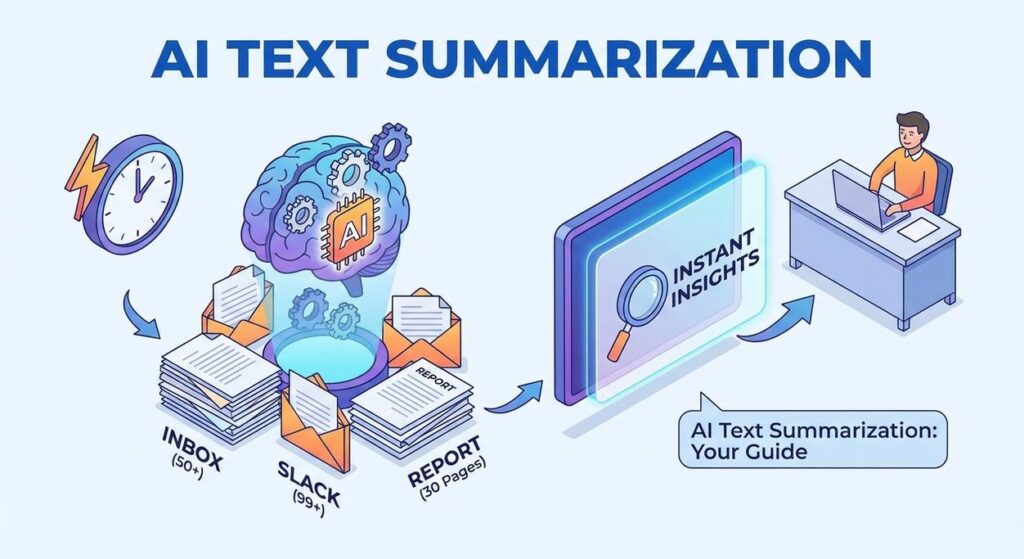
Alright, settle in. Picture this: It’s Monday morning. Your inbox just vomited 50 new emails. Slack is a warzone of unread messages. That 30-page market research report you needed to ‘skim’ by lunch is glaring at you. And your boss? She just pinged: ‘Need key takeaways from all client feedback before our 10 AM.’
You, my friend, are Kevin. Kevin is an excellent human being, but right now, Kevin is drowning. He’s highlighting, scribbling, frantically trying to distill an ocean of text into a few coherent bullet points. Kevin is the summarizer. And Kevin is about two minutes away from needing a strong espresso or a new job. Probably both.
We’ve all been Kevin. The human brain is incredible, but it wasn’t designed to be a high-throughput, always-on text processing unit. That’s a job for something else. Something faster. Something that doesn’t complain about Monday mornings.
Why This Matters
Kevin’s pain is your golden ticket. Think about it: every hour spent manually summarizing, dissecting, or even just *reading* massive amounts of text is an hour not spent actually *thinking*, strategizing, or making impactful decisions. This isn’t just about saving time; it’s about making better decisions, faster.
AI text summarization is like cloning your smartest, most efficient (and least caffeinated) intern, training them exclusively in information distillation, and then giving them a neural link directly into the internet. This digital intern never sleeps, never complains, and can digest a novel in seconds, spitting out the critical bits. It’s the ultimate weapon against information overload, replacing the endless scroll, the ‘TL;DR’ requests, and the terrifying risk of missing critical intelligence buried deep in a paragraph on page 17.
In short: More focus, less fluff. More insights, less frantic scrolling. More revenue, less ‘Kevin.’
What This Tool / Workflow Actually Is
Let’s demystify this. When we talk about AI text summarization, we’re not talking about some glorified ‘find and replace’ operation. This isn’t just about pulling out keywords or the first sentence of every paragraph. This is about feeding large amounts of unstructured text to a sophisticated Artificial Intelligence model (like OpenAI’s GPT models) and asking it to understand the core message, identify the most important information, and then rephrase it concisely and coherently.
What AI text summarization DOES do:
- Distill long documents: Turn multi-page reports into executive summaries.
- Extract key information: Pull out crucial facts, decisions, or action items from meeting transcripts.
- Synthesize complex ideas: Condense research papers or technical manuals into understandable overviews.
- Save insane amounts of time: Seriously, this is a productivity superpower.
What it DOES NOT do (and why you still need your brain):
- Guarantee 100% accuracy or avoid ‘hallucinations’: AI can sometimes misunderstand context or invent plausible-sounding but incorrect information. Always review critical summaries.
- Replace nuanced human understanding for critical decisions: It provides a *summary*, not a full contextual analysis of underlying sentiment or unstated implications.
- Understand every single unstated context: If you don’t tell it what’s important, it will use its general knowledge.
Think of it as a super-smart research assistant, not the CEO making the final call.
Prerequisites
Don’t sweat it. If you can open a web browser and copy-paste text, you’re 90% there. Here’s what you need:
- An OpenAI Account and API Key: This is your ‘key’ to unlock the AI’s power. It’s easy to get.
- A computer with internet access: Shocking, I know.
- Python (installed on your computer): If you don’t have it, don’t panic. It’s free and easy to install. Just head to python.org/downloads and follow the instructions. We’ll be using a super simple script.
- A basic text editor: Notepad, VS Code, Sublime Text, whatever you like.
No prior coding experience is required. We’re doing copy-paste-and-tweak automation here. You got this.
Step-by-Step Tutorial
Step 1: Get Your OpenAI API Key
- Go to platform.openai.com and sign up or log in.
- Once logged in, navigate to the API Keys section. Usually, you’ll find it under your profile icon in the top right, then ‘View API keys’.
- Click ‘Create new secret key’. Give it a name (e.g., ‘SummaryBot’) and immediately copy the key. You will NOT see it again. Store it securely! Treat this key like your bank password.
Step 2: Install Python ‘requests’ Library
We’ll use a simple Python library called ‘requests’ to talk to the OpenAI API. Open your computer’s terminal or command prompt (search for ‘cmd’ on Windows, ‘Terminal’ on Mac/Linux) and type this:
pip install requestsHit Enter. You’ll see some text flying by. If it says ‘Successfully installed requests’, you’re good.
Step 3: Set Your OpenAI API Key as an Environment Variable
This is crucial for security. Instead of hardcoding your key in the script (bad idea!), we’ll tell your computer to remember it temporarily. Open your terminal again:
For Mac/Linux:
export OPENAI_API_KEY='sk-YOUR_SECRET_API_KEY_HERE'For Windows (Command Prompt):
set OPENAI_API_KEY=sk-YOUR_SECRET_API_KEY_HEREFor Windows (PowerShell):
$env:OPENAI_API_KEY='sk-YOUR_SECRET_API_KEY_HERE'Replace sk-YOUR_SECRET_API_KEY_HERE with the actual key you copied from OpenAI. Do this *every time* you open a new terminal window before running your script, or look up how to set permanent environment variables for your OS if you want.
Step 4: Create Your Basic Summarization Script
Open your text editor. Copy and paste the following Python code. Save the file as summarizer.py (or any name ending with .py) in a folder you can easily find.
import requests
import json
import os

# Get your OpenAI API key from environment variables for security
openai_api_key = os.getenv("OPENAI_API_KEY")

if not openai_api_key:
    raise ValueError("OPENAI_API_KEY environment variable not set. Please set it as described in the tutorial.")

def summarize_text(text_to_summarize, max_tokens=150, model="gpt-3.5-turbo"):
    headers = {
        "Content-Type": "application/json",
        "Authorization": f"Bearer {openai_api_key}"
    }

    payload = {
        "model": model,
        "messages": [
            {"role": "system", "content": "You are a helpful assistant specialized in concise summarization. Focus on key information and main points."},
            {"role": "user", "content": f"Please summarize the following text concisely:

{text_to_summarize}"}
        ],
        "max_tokens": max_tokens,
        "temperature": 0.7 # Lower temperature makes output more focused and less creative
    }

    try:
        response = requests.post("https://api.openai.com/v1/chat/completions", headers=headers, json=payload)
        response.raise_for_status() # Raise an exception for HTTP errors (4xx or 5xx)
        summary_data = response.json()

        # Check if 'choices' and 'message' keys exist
        if 'choices' in summary_data and len(summary_data['choices']) > 0 and 'message' in summary_data['choices'][0]:
            return summary_data['choices'][0]['message']['content'].strip()
        else:
            print(f"Unexpected API response structure: {summary_data}")
            return None

    except requests.exceptions.RequestException as e:
        print(f"Error calling OpenAI API: {e}")
        return None
    except KeyError as e:
        print(f"Error parsing API response (missing key): {e}")
        # print(f"Full response: {response.text}") # Uncomment for debugging if needed
        return None

if __name__ == "__main__":
    # Test the summarization function with a sample text
    sample_text = """
    The annual general meeting of Acme Corp was held on October 26, 2023. Key topics discussed included the Q3 financial results, which showed a 15% increase in revenue year-over-year, largely driven by new product launches in the AI division. The CEO, Jane Doe, highlighted strong performance in emerging markets and outlined strategic plans for further global expansion in 2024. Shareholders approved a new board member, John Smith, a veteran in the tech industry. The meeting concluded with a Q&A session where concerns about supply chain disruptions were addressed with plans for diversification.
    """

    print("\
--- Testing single text summarization ---")
    test_summary = summarize_text(sample_text, max_tokens=80)
    if test_summary:
        print("Original Text:")
        print(sample_text)
        print("\
Generated Summary:")
        print(test_summary)
    else:
        print("Failed to generate test summary.")
Step 5: Run Your Script and Get a Summary!
Go back to your terminal. Navigate to the folder where you saved summarizer.py. If you saved it in your ‘Documents’ folder, you might type cd Documents.
Then, simply run:
python summarizer.pyYou should see your sample text summarized right there in your terminal! If you get an error about the API key, double-check Step 3.
Complete Automation Example: Summarizing Customer Feedback
Now, let’s put this to work. Imagine you have a file full of raw customer feedback, one comment per line. You want to summarize each one quickly.
Setup: Prepare your script for batch processing
Open your summarizer.py file again. Replace the entire if __name__ == "__main__": block with the following code. This version will automatically create a sample input file, process it, and save the summaries.
if __name__ == "__main__":
    # --- Complete Automation Example: Summarizing Customer Feedback ---
    print("\
--- Running Complete Automation Example (Customer Feedback) ---")
    input_file = "customer_feedback.txt"
    output_file = "summarized_feedback.txt"

    # Create a dummy input file for demonstration
    # In a real scenario, this file would already exist or be generated by another process
    try:
        with open(input_file, "w", encoding="utf-8") as f:
            f.write("Email 1: The new XYZ widget is fantastic! It really sped up my workflow. The only minor issue is the battery life, it drains a bit fast.\
")
            f.write("Email 2: I'm very disappointed with the recent update to the ABC app. It crashes frequently, and the UI is much less intuitive now. Please fix this soon!\
")
            f.write("Email 3: Just wanted to say how much I love your customer support. They helped me resolve my issue with the PQR service quickly and efficiently. Great job!\
")
            f.write("Email 4: The latest version of the XYZ widget has a critical bug where it freezes after 30 minutes of use. This is unacceptable for a premium product. Looking forward to a fix.\
")
            f.write("Email 5: Your service is generally good, but the pricing structure is a bit confusing. I wish there was a simpler tier for small businesses.\
")
        print(f"Created dummy input file: {input_file}")
    except IOError as e:
        print(f"Error creating dummy input file: {e}")
        # Exit if we can't create the input file
        exit()

    # This part reads each line from the input file, summarizes it, and writes to an output file
    try:
        with open(input_file, "r", encoding="utf-8") as infile, open(output_file, "w", encoding="utf-8") as outfile:
            for i, line in enumerate(infile):
                if line.strip(): # Only process non-empty lines
                    print(f"Summarizing feedback item {i+1}...")
                    # For each line, we assume it's one piece of feedback.
                    # You might need more sophisticated parsing for real emails.
                    item_summary = summarize_text(line.strip(), max_tokens=70) # Keeping summaries concise
                    if item_summary:
                        outfile.write(f"Summary for Item {i+1}: {item_summary}\
\
")
                        print(f"  --> {item_summary}")
                    else:
                        outfile.write(f"Summary for Item {i+1}: FAILED TO SUMMARIZE\
\
")
                        print(f"  --> FAILED TO SUMMARIZE")
            print(f"\
All feedback summarized and saved to {output_file}")
    except FileNotFoundError:
        print(f"Error: The file '{input_file}' was not found. This should not happen if creation succeeded.")
    except Exception as e:
        print(f"An unexpected error occurred during summarization: {e}")
Save summarizer.py again. Go back to your terminal and run:
python summarizer.pyWatch as your digital intern processes each piece of feedback. A new file, summarized_feedback.txt, will appear in your folder with all the concise summaries. Congratulations, you just automated a tedious, time-consuming task!
Real Business Use Cases
This isn’t just a party trick. Here are some real-world applications where AI text summarization can be a game-changer:
-
E-commerce Store / Product Development Team Leveraging AI Text Summarization
Problem: Thousands of customer reviews, product questions, and support tickets. Too much data to manually read and extract insights on product performance or common pain points.
Solution: Automate summarization of all incoming text feedback. A daily report provides concise summaries of sentiment, trending issues (e.g., ‘battery life concerns for XYZ widget’), or feature requests, allowing rapid product iteration and improved customer satisfaction.
-
Law Firms / Legal Professionals
Problem: Mountains of legal documents, case files, depositions, and research papers. Digesting these manually is incredibly time-consuming and prone to human error, delaying critical case preparation.
Solution: Summarize long legal texts to quickly grasp core arguments, identify relevant precedents, or get an overview of witness statements. This frees up paralegals and lawyers to focus on strategy rather than endless reading.
-
Financial Analysts / Investment Firms
Problem: Keeping up with earnings call transcripts, market news, analyst reports, and company filings from dozens or hundreds of companies daily. Missing a key detail can cost millions.
Solution: Automatically summarize all relevant financial documents and news articles. Analysts receive daily digests with key financial figures, sentiment indicators, and strategic announcements, enabling faster, more informed investment decisions.
-
HR Departments / Recruiting Teams
Problem: Sifting through hundreds of resumes, cover letters, and performance review documents. Identifying key skills, experience, or recurring themes in feedback is tedious.
Solution: Summarize incoming resumes to quickly highlight relevant qualifications and experience. Summarize aggregated employee feedback or performance reviews to identify common challenges, training needs, or areas of excellence.
-
Consulting Firms / Project Managers
Problem: Weekly client meeting notes, internal project updates, and research findings are often long and rambling. Project managers spend hours distilling these into actionable summaries for leadership.
Solution: Route all meeting transcripts, project update documents, and research notes through the summarization automation. Project managers receive concise daily or weekly briefings, allowing them to track progress, identify roadblocks, and communicate effectively without drowning in detail.
Common Mistakes & Gotchas
Even the coolest robot intern can trip. Here’s what beginners often mess up:
- The ‘Just Summarize This’ Prompt: Asking ‘summarize this’ is like telling a human ‘do something useful.’ You’ll get *a* summary, but probably not the one you need. Be specific! (‘Summarize this for a busy executive, focusing on action items and risks.’)
- Ignoring Token Limits: AI models have a limit on how much text they can process at once (called ‘tokens’). Try to send a 100-page document in one go, and the API will politely tell you ‘no.’ For longer documents, you need to break them into chunks and summarize each, or use more advanced techniques.
- Blind Trust: Especially for critical business decisions, never blindly trust an AI summary. Always verify key facts. It’s a tool to assist, not replace, your critical thinking.
- Sensitive Data: Be extremely cautious about sending proprietary, confidential, or personally identifiable information (PII) to public AI models without understanding their data privacy policies. For highly sensitive data, consider on-premise solutions or carefully vetted enterprise APIs.
- Cost Overruns: AI API calls cost money per token. If you’re summarizing millions of words, costs can add up. Keep an eye on your API usage dashboard.
How This Fits Into a Bigger Automation System
Think of text summarization as a foundational building block, a crucial filter in your grand automation factory. It’s rarely the final step but often an essential intermediate one:
- CRM Integration: Summarize long client communication threads or call notes directly into your CRM, giving sales and support teams instant context.
- Email & Chat Automation: Digest inbound emails, support tickets, or chat logs. A summarized version can then be routed to the right department or used by a separate AI agent to draft a response.
- RAG (Retrieval Augmented Generation) Systems: Before an AI agent answers a complex question, it might ‘retrieve’ relevant documents. Summarization can then distil these retrieved documents, making them easier for the final AI to process and synthesize, leading to more accurate and concise answers.
- Multi-Agent Workflows: Imagine a chain: An ‘Information Gatherer’ agent scrapes data from the web. A ‘Summarizer’ agent (what we built today) distills that data. Then a ‘Decision-Making’ agent uses the summary to recommend a course of action.
- Voice Agents/Transcripts: Real-time meeting or call transcripts can be summarized instantly, providing ‘live’ key takeaways for participants or for follow-up documentation.
It’s the ultimate ‘pre-processor’ for nearly any information-heavy automation.
What to Learn Next
You’ve taken the first epic step into freeing yourself from the tyranny of text. You’ve built your first robot intern!
Next up, we’ll dive deeper into Prompt Engineering for Summarization. We’ll explore how to get *exactly* the kind of summary you need – an executive summary, bullet points of action items, a summary focused on sentiment, or even a summary tailored for a specific audience. This is where you really start to boss around your digital assistant with precision.
After that, we’ll look at techniques for summarizing *really* long documents (think entire books!) by chaining our summarization methods. And then, we’ll integrate this magic into no-code platforms like Zapier or Make, so you can connect it to your existing business tools without writing a single line of Python.
Stay curious, keep building, and remember: Your brain is for brilliant ideas, not for being a human scroll wheel.
“,
“seo_tags”: “”,
“suggested_category”: “AI Automation Courses





