
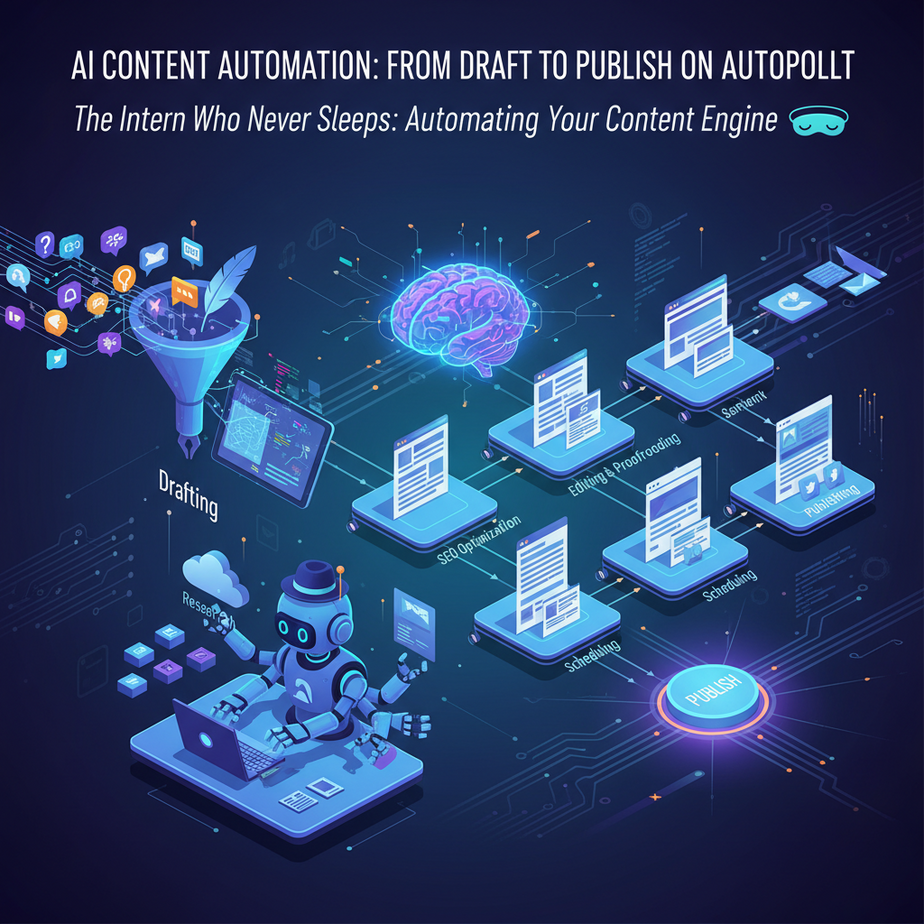
The Intern Who Never Sleeps: Automating Your Content Engine
Alright, listen up, because I’ve seen more content graveyards than I care to admit. You know the drill: brainstorm ideas until your brain feels like a deflated balloon, wrestle with writers’ block, edit ’til your eyes cross, then manually copy-paste the whole thing across three social platforms only to repeat it all next week. It’s a soul-crushing, time-sucking cycle that turns even the most passionate marketer into a zombie.
I remember one client, a small business owner named Sarah. She was brilliant at what she did, but her ‘content strategy’ was basically a panic-induced scramble every Tuesday morning. She’d spend hours trying to churn out a blog post, often missing publication dates, then forget to share it on LinkedIn entirely. Her enthusiasm for her business was slowly being crushed under the weight of manual content creation. She wasn’t building a brand; she was building an endless chore list.
Today, we’re building a robot intern. One that doesn’t complain, doesn’t need coffee breaks, and most importantly, never sleeps. It’s going to churn out content drafts and push them out into the world while you focus on, you know, actually running your business. Welcome to the automated content factory.
Why Your Business Needs an AI Content Production Line
Look, content is the oxygen of modern business. Blogs, social posts, emails, product descriptions – it’s all vital for attracting customers and staying relevant. But the old way? It’s like trying to fill an Olympic swimming pool with a leaky teacup. Slow, inefficient, and utterly draining.
This automation isn’t about replacing human creativity entirely; it’s about amplifying it. Imagine this:
- Massive Time Savings: Those hours spent drafting? Gone.
- Scalable Output: Go from one blog post a week to three, or even daily social updates, without hiring a single person.
- Consistent Brand Voice: Train your AI once, and it maintains your tone across all content, no matter how many pieces it generates.
- Improved Lead Generation: More content means more discoverability, more traffic, and ultimately, more leads.
- Sanity Preservation: Get your Tuesdays back. Get your weekends back. Spend less time on repetitive tasks and more time on strategy, innovation, or just chilling.
This isn’t just about saving a few bucks on a junior copywriter; it’s about unlocking a level of content velocity that was previously impossible for most businesses. It’s about turning your content efforts into a revenue-generating machine instead of a time sink.
What This Workflow Actually Is (and Isn’t)
At its core, this workflow is a three-stage pipeline:
- Idea & Draft Generation: We use a Large Language Model (LLM) like ChatGPT to generate initial content concepts, outlines, and full drafts based on your specific prompts.
- Orchestration: An automation platform (like Zapier or Make.com) acts as the conductor, taking the generated content, transforming it if needed, and passing it to the next stage.
- Distribution: The final content (or snippets of it) is sent to your Content Management System (CMS), social media scheduler, email platform, or even just a Google Sheet for review.
What it IS: A powerful tool for generating *drafts*, outlines, social media snippets, email copy, and other initial content rapidly. It’s fantastic for overcoming writer’s block, ensuring consistent output, and handling the grunt work of content creation and distribution.
What it IS NOT: A magic bullet that eliminates the need for human review. Your AI isn’t going to craft Pulitzer-winning prose (yet). It needs supervision, fine-tuning, and a human touch for nuance, factual accuracy, and genuine engagement. Think of it as a super-efficient first-draft machine, not a replacement for your brain.
Prerequisites: What You’ll Need to Get Started
Don’t worry, we’re not building a rocket ship here. If you can click buttons and copy-paste, you’re 90% there. Here’s your toolkit:
- An AI Language Model Account: ChatGPT (Plus or API access), Anthropic Claude, or Google Gemini. For this tutorial, we’ll assume access to an LLM capable of API calls or easily integrated with Zapier/Make. Many automation platforms have direct integrations.
- An Automation Platform Account: Zapier (I’ll reference Zapier, but Make.com works just as well). A free tier is often enough to start, but you’ll likely need a paid plan for continuous, robust automation.
- A Content Destination: This could be anything: A Google Sheet (for drafts), a WordPress blog, Ghost CMS, your social media scheduler (e.g., Buffer, Hootsuite), or even just an email draft. For simplicity in our tutorial, we’ll use a Google Sheet to store our generated blog post drafts.
- Basic Prompt Engineering Mindset: The ability to give clear instructions to your AI. We’ll cover some basics.
No coding experience? No problem. We’re using no-code tools for this. Breathe easy.
Step-by-Step Tutorial: Building Your First Content Automation Workflow
Let’s build a simple, yet powerful, automation: Generating a blog post draft and its social media blurb from a single input, then saving it to a Google Sheet for review.
Step 1: Set Up Your Input (The Trigger)
We need a way to tell our automation what topic to write about. A simple Google Sheet works perfectly for this.
- Create a New Google Sheet: Name it something like “AI Blog Content Queue”.
- Add Headers: In the first row, add two headers:
Blog TopicandStatus. - Add Your First Topic: In cell A2, type a blog topic, e.g., “Benefits of AI for Small Business Marketing”. Leave B2 empty for now.
Step 2: Create Your Automation (Zapier)
Login to Zapier and click “Create Zap”.
Step 3: Trigger: New Row in Google Sheets
- Choose App & Event: Search for “Google Sheets” and select it. For the “Trigger Event”, choose “New Spreadsheet Row”. Click “Continue”.
- Choose Account: Select or connect your Google account. Click “Continue”.
- Set Up Trigger:
- Spreadsheet: Select your “AI Blog Content Queue” spreadsheet.
- Worksheet: Select “Sheet1” (or whatever your sheet is named).
Click “Continue”.
- Test Trigger: Click “Test Trigger”. Zapier will pull in the “Benefits of AI for Small Business Marketing” topic you added. Ensure it works. Click “Continue”.
Step 4: Action: Generate Blog Post Draft (ChatGPT)
Now, we’ll tell the AI what to write.
- Choose App & Event: Search for “ChatGPT” (or your preferred LLM like “OpenAI” if you’re using the API directly for more control). Select it. For “Action Event”, choose “Conversation”. Click “Continue”.
- Choose Account: Connect your ChatGPT/OpenAI account. Click “Continue”.
- Set Up Action:
- User Message: This is your prompt. Craft it carefully. Here’s a powerful one:
Write a 500-word blog post draft on the topic: "[[1. Blog Topic]]".

The post should be engaging, informative, and include an introduction, 3-4 key points with short paragraphs, and a conclusion with a clear call to action. Adopt a slightly humorous, encouraging tone. Ensure factual claims are general knowledge and not highly specialized. Also, generate 2-3 short, engaging social media posts (for LinkedIn/Twitter) based on this blog post.
(Note: Replace
[[1. Blog Topic]]with the actual `Blog Topic` field from your Google Sheets trigger in Zapier’s interface – Zapier allows you to insert dynamic data from previous steps.) - Assistant Message: Leave blank.
- Model: Choose a powerful model, like
gpt-4orgpt-3.5-turbo. - Temperature: Keep it around
0.7for a good balance of creativity and coherence. - Test Action: Click “Test Step”. This will send your topic to ChatGPT and generate a draft. Review the output in Zapier – you should see the blog post and social snippets. Click “Continue”.
Click “Continue”.
Step 5: Action: Save Draft to Google Sheet
We need a place to store our AI-generated content for human review.
- Choose App & Event: Search for “Google Sheets” and select it. For “Action Event”, choose “Update Spreadsheet Row”. Click “Continue”.
- Choose Account: Select your Google account. Click “Continue”.
- Set Up Action:
- Spreadsheet: Select your “AI Blog Content Queue” spreadsheet.
- Worksheet: Select “Sheet1”.
- Row: Crucially, select the `Row ID` from Step 1 (your Google Sheet trigger). This ensures we update the *same row* we triggered from.
- Blog Topic: (Optional) Map this back to `1. Blog Topic` if you want.
- Status: Type “Draft Generated” or “Ready for Review”.
- Add a New Column: For the blog content, we need a new column. Go back to your Google Sheet, add a new header called
Blog Post Draftand another calledSocial Media Snippets. Refresh fields in Zapier. - Blog Post Draft: Map this to the *full blog post text* from your ChatGPT output (Step 4). You might need to parse the ChatGPT output if it combines the blog and social snippets. If it’s all in one field, we’ll need a “Formatter” step in between to split them. For now, assume it’s one big chunk.
- Social Media Snippets: Map this to the social media text from your ChatGPT output.
Click “Continue”.
- Test Action: Click “Test Step”. Check your Google Sheet. You should see the “Status” updated and the content fields populated! Click “Continue”.
Step 6: Turn On Your Zap!
Give your Zap a name (e.g., “AI Blog Draft Generator”) and turn it ON. Congratulations! You’ve just built your first content automation pipeline.
Complete Automation Example: Blog Post & Social Campaign Launch
Let’s take it a step further. Imagine you’re a SaaS company launching a new feature. You need a blog post, social media announcements, and an email newsletter segment.
The Workflow:
- Trigger: A new row in a Google Sheet called “Product Launch Content Plan” with columns like `Feature Name`, `Target Audience`, `Key Benefits`. Or, even better, a new task completed in a project management tool like Asana/Trello with a specific tag.
- Action 1 (LLM – ChatGPT): Generate a comprehensive blog post draft for the new feature. The prompt would leverage `Feature Name`, `Target Audience`, `Key Benefits` from the trigger.
- Action 2 (LLM – ChatGPT): Generate 5 unique social media posts (for LinkedIn, Twitter, Facebook) based on the blog post content. Focus on different angles and include relevant hashtags.
- Action 3 (LLM – ChatGPT): Generate a short email newsletter segment introducing the new feature, highlighting benefits, and linking to the blog post.
- Action 4 (Google Sheets/CMS API): Update the original Google Sheet row with all generated drafts (Blog, Social, Email) for human review.
- Action 5 (Optional – Conditional Logic): Once a human reviewer marks the content as “Approved” in the Google Sheet (a separate trigger), then:
- Action 5a (WordPress/Ghost API): Publish the blog post directly to your CMS.
- Action 5b (Buffer/Hootsuite): Schedule the social media posts across your platforms.
- Action 5c (Mailchimp/ConvertKit): Add the email segment to a draft email campaign.
This entire process, from a single input to published content and scheduled promotions, can be handled with a series of connected Zaps or a single, more complex Make scenario. You’re effectively building an entire content marketing department out of digital bricks.
Real Business Use Cases: Who Needs This Robot Intern?
Practically everyone who needs to communicate with an audience, which is… everyone.
- E-commerce Store Owner:
- Problem: Manually writing unique, keyword-rich product descriptions for hundreds of items is a nightmare, leading to generic copy and poor SEO.
- Solution: When a new product is added to inventory (trigger from Shopify/WooCommerce), AI generates 3 unique product descriptions based on product name, features, and target keywords. These are then saved to a draft in your CMS or directly pushed after approval.
- SaaS Startup Founder:
- Problem: Needs consistent blog content to drive SEO and thought leadership but lacks a large marketing team.
- Solution: Set up a weekly trigger from a Google Sheet of topics. AI drafts a full blog post, creates social media snippets, and even suggests email subject lines for promotion. These drafts are sent to a reviewer, then published automatically.
- Real Estate Agent:
- Problem: Crafting unique, compelling property descriptions for every new listing, plus neighborhood guides, is time-consuming.
- Solution: When a new listing appears in their MLS system (or a Google Sheet), AI generates a captivating property description, highlights key features, and even drafts a local area spotlight paragraph for social media promotion.
- Online Course Creator / Coach:
- Problem: Needs to constantly create educational content, social media posts, and email newsletters to engage their audience and promote courses.
- Solution: From a simple course module outline, AI can generate short lesson summaries, create interactive quiz questions, draft promotional social posts, and even outline a nurture email sequence for new students.
- Local Restaurant Owner:
- Problem: Struggling to regularly post about daily specials, upcoming events, or new menu items on social media.
- Solution: A simple input (e.g., a form submission or a row in a Google Sheet) about the “Special of the Day” (e.g., “Lobster Ravioli, $25, available Friday-Sunday”) triggers AI to generate catchy social media posts with relevant emojis and hashtags, ready to be scheduled automatically to Instagram and Facebook.
Common Mistakes & Gotchas (Professor Ajay’s Wisdom)
Don’t be that person. Learn from others’ mistakes:
- “Set It and Forget It” Mentality: This isn’t a magic wand. AI-generated content needs human review for accuracy, brand voice, nuance, and to avoid sounding robotic. A human touch makes it resonate.
- Bad Prompts, Bad Output: Garbage in, garbage out. If your prompt is vague, generic, or poorly structured, your AI will give you bland, unusable content. Spend time refining your prompts.
- Over-Reliance on Factual Accuracy: LLMs are confident guessers. They can hallucinate. ALWAYS fact-check anything that matters. Your reputation is on the line, not the AI’s.
- Ignoring SEO Best Practices: While AI can generate keywords, it doesn’t automatically optimize for SEO. You still need a strategy for keyword research and integration, which often means human oversight or a dedicated SEO tool.
- Hitting API Limits: If you scale too quickly, you might hit rate limits on your LLM API or automation platform. Monitor your usage and upgrade plans as needed.
- Lack of Consistency in Tone: If you don’t explicitly instruct the AI on your brand voice in every prompt, you might get inconsistent results. Create a clear tone guide for your prompts.
How This Fits Into a Bigger Automation System (The Grand Vision)
This content generation and distribution system is a powerful standalone, but it’s just one cog in a larger, magnificent machine:
- Connected to your CRM: Imagine AI generating personalized follow-up emails for new leads based on their interaction data from your CRM (e.g., HubSpot, Salesforce).
- Fueling Email Marketing: Automatically draft email sequences for different segments of your audience, promoting relevant content or products based on their past behavior.
- Powering Voice Agents: The same AI-generated content can be adapted to provide answers for customer service chatbots or voice agents, ensuring consistent information.
- Multi-Agent Workflows: This simple setup evolves. You could have one AI agent generating the draft, another acting as an ‘editor’ to refine it, and a third ‘SEO specialist’ to optimize it before publication.
- RAG (Retrieval Augmented Generation) Systems: Connect your AI to a database of your own internal knowledge, brand guidelines, or past successful content. This ensures the AI generates highly specific, brand-aligned, and factual content based on your proprietary data, moving beyond general knowledge.
Think of this as establishing the content supply chain for your entire digital ecosystem. Every part of your business that needs to communicate can now draw from this automated wellspring of content.
What to Learn Next: Expanding Your Content Empire
You’ve built your first content automation robot. Give yourself a pat on the back – that’s more than most people will ever achieve! But we’re just scratching the surface.
Next up, we’ll dive deep into **advanced prompt engineering**. We’ll learn how to craft prompts that generate specific content structures, inject precise brand voice, handle complex data inputs, and even instruct the AI to adopt different personas. Imagine generating content in the style of a wise professor, a quirky influencer, or a no-nonsense CEO – all with a few lines of instruction. This will unlock even more powerful content automation. Get ready to truly master your AI’s creative output.
This is part of your journey through the Academy, and the skills you’re building now are fundamental. Keep pushing those pixels, and I’ll see you in the next lesson!





