
Hook
Alright, you content creators, marketing maestros, and info-share enthusiasts, let’s have a frank chat about the content hamster wheel. You spend hours, sometimes days, crafting that one perfect blog post, that in-depth article, or that insightful whitepaper. It’s a masterpiece! You hit publish, share it once or twice, and then… it vanishes into the digital ether, rarely to be seen again. Meanwhile, you’ve still got a social media calendar to fill, an email newsletter to send, maybe a short video script to draft, and you’re back to staring at a blank screen, trying to figure out how to make that same valuable information sound fresh and new for a dozen different platforms.
It’s like spending a week baking a magnificent, multi-tiered cake, only to serve one slice and then realize you also need to make cupcakes, cookies, and a fruit tart from the exact same ingredients, all by hand, and quickly. Exhausting, right? What if I told you that you could have a tireless, creative robot sous chef who could take your one magnificent cake and instantly transform it into perfectly packaged cupcakes, charming cookies, and even a tart recipe, all optimized for different tastes and delivery methods, with a consistent flavor profile? Today, we’re building that content-repurposing robot.
Why This Matters
This isn’t about magical content creation; it’s about maximizing your existing investment and unlocking new levels of efficiency and reach:
- Maximize Content ROI: You poured effort into that original piece. Don’t let it die! Repurposing ensures you squeeze every drop of value from your content, reaching more people across more channels without creating new material from scratch.
- Vast Time & Cost Savings: Imagine the hours saved by not having to manually summarize, rephrase, and reformat content for Twitter, LinkedIn, Instagram captions, email snippets, and more. This frees up your content team (or you!) to focus on creating *new* pillar content or engaging with your audience, rather than repetitive grunt work. You’re effectively replacing or supercharging a team of content adaptors.
- Wider Audience Reach: Different platforms, different audiences. Some prefer short videos, others love LinkedIn articles, some just want a quick tweet. Repurposing ensures your message reaches people in their preferred format, dramatically expanding your potential audience.
- Consistent Messaging: When you’re repurposing from a single source, your core message remains consistent across all channels. This reinforces brand identity and prevents conflicting information.
- Boost SEO & Engagement: More content across more platforms means more touchpoints, more backlinks, and more opportunities for engagement, all of which algorithms love.
This automation transforms your content strategy from a one-and-done effort to a multi-channel amplification machine. You go from content creator to content empire builder, all with less effort.
What This Tool / Workflow Actually Is
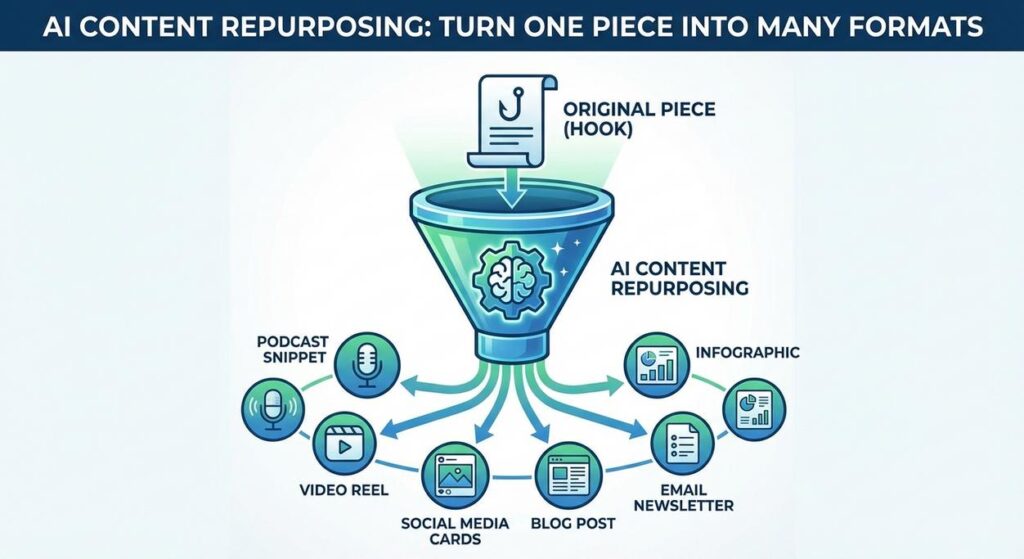
This workflow uses a Large Language Model (LLM) as an intelligent content transformer. You feed it a long-form piece of text, and with specific instructions (a "prompt"), it generates various shorter, tailored versions suitable for different platforms.
- Source Content Ingestion: The AI takes your original, comprehensive content (e.g., a blog post) as its primary input.
- AI Transformation (The "Repurposer"): Based on your detailed prompt, the AI performs tasks like: summarizing, extracting key quotes, rephrasing for brevity, adopting specific tones (e.g., casual for Instagram, professional for LinkedIn), and adding platform-specific elements (hashtags, CTAs).
- Structured Multi-Format Output: Crucially, the AI delivers its repurposed content in a structured format (like JSON). This includes distinct sections for each desired output type (e.g., an array of tweets, a LinkedIn post object, an email subject line). This structured output is vital for subsequent automation steps.
What it DOES do:
- Generate summaries and highlights from long text.
- Create short-form content (tweets, social posts, captions).
- Draft email subject lines and introductory paragraphs.
- Suggest short video scripts or talking points.
- Adapt content tone and style for different platforms/audiences.
- Extract key takeaways and quotes.
What it DOES NOT do:
- Create the *original* piece of long-form content (though it can assist with that in other workflows).
- Guarantee virality or specific engagement metrics.
- Automatically *publish* content to platforms (it generates the text, integration handles publishing).
- Create rich visual content (images, full videos) – it generates *text* for these formats.
- Fact-check its original input or hallucinate new facts.
Prerequisites
No surprises here, just the usual suspects:
- An OpenAI Account: With API access and a generated API key. Make sure you have some credit for usage.
- A Computer with Internet Access: Your digital control center.
- Python Installed: For our script to talk to the AI.
- A Text Editor: Like VS Code, Sublime Text, or similar.
- A Piece of Long-Form Content: This could be a blog post, article, or even a detailed email. Save it as a
.txtfile (e.g.,original_article.txt).
You’re basically a content magnate in the making. Let’s get to it!
Step-by-Step Tutorial
Step 1: Get Your OpenAI API Key (or confirm you have it)
You know the drill by now:
- Go to the OpenAI Platform.
- Log in or create an account.
- Navigate to the API Keys section.
- Click "Create new secret key."
- Copy this key! Don’t lose it; you won’t see it again.
Step 2: Prepare Your Original Content (original_article.txt)
We need a good source text to repurpose. Create a file named original_article.txt in your working directory and paste a decent chunk of text into it. For example, a simplified blog post:
Title: The Unseen Power of AI in Small Business Automation

Introduction:
Many small business owners view AI as a futuristic, expensive technology out of reach. However, the reality is that AI-powered automation is more accessible and transformative than ever, offering unprecedented opportunities for growth and efficiency.

Section 1: Freeing Up Time for What Matters
One of the biggest struggles for small businesses is limited resources. AI automation can take over repetitive, time-consuming tasks like data entry, customer support FAQs, and social media scheduling. Imagine spending less time on invoicing and more time on strategic planning or client relationships. This isn't about replacing humans, but about empowering them to do higher-value work.

Section 2: Smart Marketing on a Shoestring Budget
AI can democratize marketing. It can generate personalized email drafts, optimize ad copy for better conversion, and even suggest content ideas based on market trends. This allows small businesses to compete with larger players by having a sophisticated, always-on marketing assistant without the hefty agency fees.

Section 3: Enhanced Customer Experience
From AI-powered chatbots handling basic inquiries 24/7 to personalized product recommendations, AI can significantly uplift customer experience. Faster response times and tailored interactions lead to higher customer satisfaction and loyalty, directly impacting repeat business and referrals.

Conclusion:
The integration of AI automation is no longer an option but a necessity for small businesses looking to thrive in a competitive landscape. By embracing these tools, owners can unlock efficiency, foster growth, and build a more resilient and responsive operation. Start small, experiment, and watch your business transform.
Step 3: Crafting the AI Repurposing Prompt
This is where you define exactly what you want from the AI. We’ll ask for several formats in structured JSON.
You are an expert content strategist and marketing specialist. Your task is to repurpose a given article into multiple formats suitable for different digital channels. The target audience is small business owners interested in efficiency and growth.

Instructions:
1. Read the provided article carefully.
2. Generate the following content formats based on the article:
   - One concise summary suitable for an email introduction (50-70 words).
   - Two unique LinkedIn posts (each 50-100 words), professional tone, include 2-3 relevant hashtags.
   - Three unique Twitter/X posts (each 20-40 words), engaging tone, include 2-3 relevant hashtags and emojis.
   - One Instagram caption (30-60 words), engaging and aspirational tone, include 3-5 relevant hashtags and emojis.
   - Three catchy email subject lines for a newsletter promoting the article (under 10 words each).
   - A short video script idea (around 60-80 words) for a 30-second explainer, outlining 3 key talking points.

3. Ensure all outputs maintain a consistent, empowering, and informative tone, aligning with the article's message.
4. Provide the output in JSON format. Each content type should be an array of strings, except for the email_intro and video_script, which should be single strings.

Example Output Structure:
{
  "email_intro": "...",
  "linkedin_posts": [
    "Post 1",
    "Post 2"
  ],
  "twitter_posts": [
    "Tweet 1",
    "Tweet 2",
    "Tweet 3"
  ],
  "instagram_caption": "...",
  "email_subject_lines": [
    "Subject 1",
    "Subject 2",
    "Subject 3"
  ],
  "video_script": "..."
}

Here is the article:
"""
{ARTICLE_CONTENT_HERE}
"""
Why this prompt is effective:
- Role-Playing & Audience: "Expert content strategist… target audience is small business owners…" sets the context.
- Clear, Multi-Part Task: Explicitly lists all desired output formats and their specific constraints (word count, tone, hashtags).
- Consistency Instructions: "Ensure all outputs maintain a consistent, empowering, and informative tone."
- JSON Format & Example: Absolutely critical for machine readability and ease of use in subsequent automation.
- Placeholder:
{ARTICLE_CONTENT_HERE}is where our Python script will inject the article.
Step 4: Writing the Python Script for Content Repurposing
Open your text editor, create a file named content_repurposer.py in the same directory as your original_article.txt, and paste the following code:
import os
import openai
import json

# --- Configuration --- START ---
# Set your OpenAI API key as an environment variable (recommended)
# Or, uncomment the line below and replace 'YOUR_OPENAI_API_KEY' with your actual key
# os.environ["OPENAI_API_KEY"] = "YOUR_OPENAI_API_KEY"

# Get API key from environment variable
openai.api_key = os.getenv("OPENAI_API_KEY")

if not openai.api_key:
    print("Error: OpenAI API key not found. Please set it as an environment variable (OPENAI_API_KEY) or uncomment and set it directly in the script.")
    exit()

ARTICLE_PATH = "original_article.txt"
OUTPUT_JSON_PATH = "repurposed_content.json"

# --- Configuration --- END ---

def read_article(file_path):
    try:
        with open(file_path, 'r', encoding='utf-8') as f:
            return f.read()
    except FileNotFoundError:
        print(f"Error: Article not found at {file_path}")
        return None
    except Exception as e:
        print(f"An error occurred while reading the article: {e}")
        return None

def repurpose_content(article_content):
    if not article_content:
        return None

    prompt = f"""
You are an expert content strategist and marketing specialist. Your task is to repurpose a given article into multiple formats suitable for different digital channels. The target audience is small business owners interested in efficiency and growth.

Instructions:
1. Read the provided article carefully.
2. Generate the following content formats based on the article:
   - One concise summary suitable for an email introduction (50-70 words).
   - Two unique LinkedIn posts (each 50-100 words), professional tone, include 2-3 relevant hashtags.
   - Three unique Twitter/X posts (each 20-40 words), engaging tone, include 2-3 relevant hashtags and emojis.
   - One Instagram caption (30-60 words), engaging and aspirational tone, include 3-5 relevant hashtags and emojis.
   - Three catchy email subject lines for a newsletter promoting the article (under 10 words each).
   - A short video script idea (around 60-80 words) for a 30-second explainer, outlining 3 key talking points.

3. Ensure all outputs maintain a consistent, empowering, and informative tone, aligning with the article's message.
4. Provide the output in JSON format. Each content type should be an array of strings, except for the email_intro and video_script, which should be single strings.

Here is the article:
"""
{article_content}
"""
"""

    print("Sending article for AI repurposing...")
    try:
        response = openai.chat.completions.create(
            model="gpt-3.5-turbo",  # Or "gpt-4" for even better creative quality, but higher cost
            messages=[
                {"role": "system", "content": "You are a helpful assistant designed to output JSON."},
                {"role": "user", "content": prompt}
            ],
            response_format={"type": "json_object"},
            temperature=0.8 # Higher temperature for more creative variations
        )

        repurposed_json_str = response.choices[0].message.content
        return json.loads(repurposed_json_str)
    except json.JSONDecodeError as e:
        print(f"Error decoding JSON from AI response: {e}")
        print(f"Raw AI response: {repurposed_json_str}")
        return None
    except Exception as e:
        print(f"An error occurred during AI repurposing: {e}")
        return None

def write_json_output(data, file_path):
    if not data:
        print("No data to write.")
        return
    try:
        with open(file_path, 'w', encoding='utf-8') as f:
            json.dump(data, f, indent=4)
        print(f"Repurposed content saved to {file_path}")
    except Exception as e:
        print(f"Error writing JSON output: {e}")

# --- Main execution ---
if __name__ == "__main__":
    article_content = read_article(ARTICLE_PATH)
    if article_content:
        repurposed_results = repurpose_content(article_content)
        if repurposed_results:
            write_json_output(repurposed_results, OUTPUT_JSON_PATH)
Before you run:
- Install OpenAI library: Open your terminal or command prompt and run:
pip install openai - Set your API Key: As always, set
OPENAI_API_KEYas an environment variable. Or, for quick testing, uncomment and replace"YOUR_OPENAI_API_KEY"in the script. - Run the script: In your terminal, navigate to the directory and execute:
python content_repurposer.py
Voila! A new file, repurposed_content.json, will appear, containing all your magically transformed content, ready to go!
Complete Automation Example
Let’s consider "InsightForge," a B2B consulting firm that publishes one in-depth market analysis article on their blog every week. This article is a goldmine of information, but they struggle to get it seen beyond their core subscribers because repurposing it manually for all their other channels takes too much time.
The Problem:
Their excellent, data-rich articles are underutilized. The marketing team spends an entire day each week summarizing the article for an email, drafting 5-10 social media posts (LinkedIn, Twitter, Facebook), and trying to come up with a compelling "talking points" for their sales team to share. This bottleneck means less engagement and missed opportunities.
The Automation:
- Article Publication Trigger: Once the weekly market analysis article is published on their WordPress blog, an automation (e.g., using a webhook from WordPress or a scheduled check) extracts the full text of the article.
- AI-Powered Repurposing: The extracted article content is fed to our
content_repurposer.pyscript (or a similar cloud-hosted function). The prompt is fine-tuned to generate: an executive summary for internal sales briefings, 3 LinkedIn posts, 5 tweets/X posts, 2 Facebook posts, an Instagram carousel caption idea, 3 email subject lines, and 2 short video script ideas highlighting key takeaways. - Structured Output to Marketing Hub: The AI returns a JSON object containing all these repurposed content pieces. This JSON is then automatically pushed to InsightForge’s content calendar tool (e.g., Asana, Monday.com) or a Google Sheet.
- Human Review & Scheduling: The marketing manager and sales team quickly review the AI-generated content. They make minor edits, add specific calls to action relevant to current campaigns, and then schedule the posts across all platforms using their social media scheduler (e.g., Buffer, Hootsuite) and email marketing tool (e.g., Mailchimp).
Result: InsightForge maximizes the reach and impact of every article. The marketing team reclaims an entire day of work each week, freeing them to strategize, analyze performance, or engage directly with high-value leads. Their content now consistently fuels all their digital channels, boosting brand awareness and lead generation.
Real Business Use Cases (MINIMUM 5)
This automation is a game-changer for anyone producing significant content:
-
Content Marketing Agencies (like InsightForge)
Problem: Managing content campaigns for multiple clients, each requiring diverse content formats (blogs, social, email, press releases) from core themes, is a massive logistical and creative challenge.
Solution: AI takes a client’s main blog post or whitepaper and automatically generates tailored social media posts (Facebook, LinkedIn, Twitter, Instagram), email newsletter blurbs, potential ad copy, and even snippets for press releases, all adapted to the client’s brand voice. This enables agencies to deliver more content, faster, for multiple clients.
-
Online Course Creators / Educators
Problem: Turning long lesson transcripts or webinar recordings into marketing materials (promo emails, social media teasers, short video hooks) is a time-consuming step after content creation.
Solution: AI processes lesson transcripts, extracting key learning outcomes, creating engaging social media posts to promote the course, drafting email teasers for new enrollments, and generating short video scripts that highlight a specific concept from the lesson. This supercharges course promotion.
-
SaaS Companies (for Release Notes & Product Updates)
Problem: Communicating new features and updates to different audiences (developers, end-users, management) requires rewriting the same information in varying technicalities and lengths for blog posts, email updates, and in-app notifications.
Solution: AI takes the detailed technical release notes and repurposes them into user-friendly blog posts, short marketing announcements for social media, simplified in-app messages, and even an executive summary highlighting business impact. This ensures everyone gets the right message, fast.
-
Financial Advisors / Investment Firms
Problem: Distilling complex market analysis or economic reports into understandable client communications (email newsletters, social media insights, brief summaries) is a critical but time-intensive task.
Solution: AI processes the full market report, generating an executive summary for high-level clients, bite-sized "market insight" tweets, longer LinkedIn posts explaining trends, and an engaging intro for the weekly client newsletter. This allows advisors to keep clients informed consistently and efficiently.
-
Non-Profit Organizations
Problem: Repurposing impact reports, annual reviews, or success stories into engaging content for fundraising appeals, donor updates, volunteer recruitment, and social media takes significant effort from already stretched teams.
Solution: AI takes a detailed impact story and transforms it into emotional fundraising email snippets, concise social media posts with calls for donations/volunteers, and bullet-point summaries for internal updates. This amplifies their message and appeal across various stakeholder groups.
Common Mistakes & Gotchas
- Generic Prompts: "Repurpose this" is not enough. You *must* specify the target platform, audience, desired tone, and length for each output format. The more detail, the better.
- No Human Review: The AI is a tool, not a replacement for human judgment. Always review and refine the generated content. AI can sometimes miss nuance, sound robotic, or make subtle errors.
- Loss of Nuance & Context: When shortening content, it’s easy to lose critical context. Carefully check that the repurposed pieces still convey the intended message accurately and don’t misrepresent the original.
- Over-Summarizing: Be careful not to strip away too much detail, rendering the repurposed piece useless. Balance brevity with retaining core value.
- Ignoring Platform Best Practices: While the prompt helps, always ensure the final output truly fits the platform (e.g., using relevant visual cues for Instagram, professional language for LinkedIn).
- Token Limits for Very Long Inputs: If your original article is extremely long (e.g., a book chapter), you might hit OpenAI’s token limits. You may need to summarize the article *first* (using a separate AI call) or split it into chunks.
- Lack of Call to Action (CTA): Don’t forget to explicitly tell the AI to include relevant CTAs in its repurposed content, or add them manually during review.
How This Fits Into a Bigger Automation System
Content repurposing is a central hub in a fully automated content creation and distribution pipeline:
- CMS (Content Management System) & Blog Platforms: The original content source. Future automations could trigger directly from a new blog post.
- Social Media Schedulers (Buffer, Hootsuite, Later): The AI’s JSON output can be directly fed into these tools, automating the scheduling of all your repurposed social media posts.
- Email Marketing Platforms (Mailchimp, HubSpot, ActiveCampaign): AI-generated email intros and subject lines can auto-populate your newsletter drafts, speeding up email campaign creation.
- CRM (Customer Relationship Management) & Sales Enablement: Repurposed summaries or key takeaways can be pushed to your CRM, providing sales teams with fresh, bite-sized insights to share with prospects.
- Multi-Agent Workflows: Imagine an agent that drafts the initial article, then passes it to *this* repurposing agent, which then sends the various outputs to a scheduling agent, and finally, an analytics agent tracks performance and suggests future content themes.
- RAG (Retrieval Augmented Generation) Systems: The repurposed content itself can become part of your RAG knowledge base, making it easier for a customer service chatbot or internal AI assistant to provide quick answers about your latest content.
What to Learn Next
You’ve just learned how to multiply your content’s impact without multiplying your effort. This is a truly powerful skill for any business. You’re no longer just creating content; you’re building a content amplification engine.
In our upcoming lessons, we’ll dive deeper into:
- Visual Content Repurposing: How to use AI to generate images, video ideas, and even simple video scripts that complement your repurposed text.
- Advanced Scheduling & Publishing Workflows: Connecting your AI-generated content directly to various platforms for hands-free publishing.
- Performance Analytics & Feedback Loop: How to track which repurposed content performs best and use that data to continuously improve your AI prompts.
- Personalized Content Distribution: Using AI to not only repurpose content but also to tailor *which* repurposed content is sent to *which* segment of your audience.
Get ready to dominate your content channels and leave your competition wondering how you do it. The world of infinite content is at your fingertips. Stay curious, keep building, and I’ll see you in the next lesson!





