
the shot
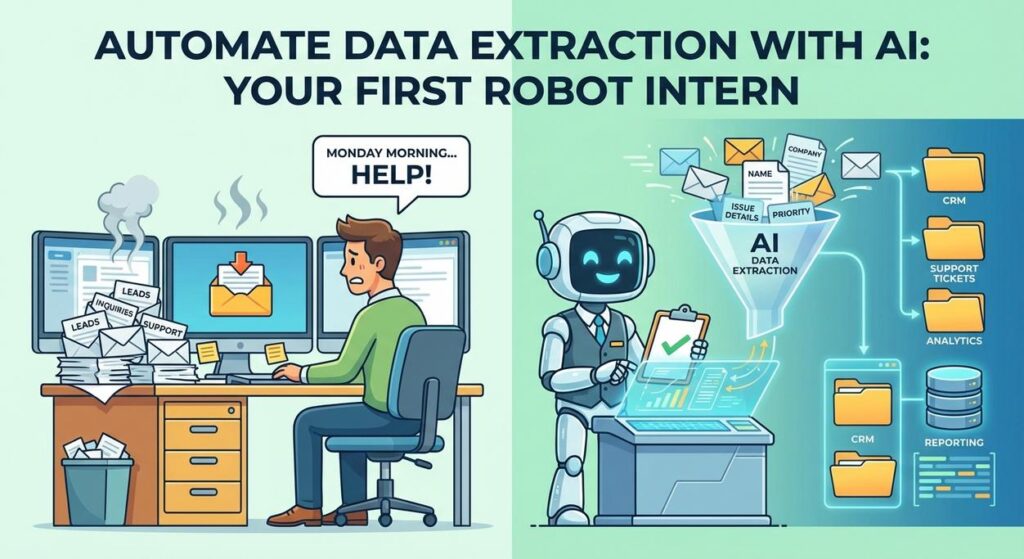
Picture this: It’s Monday morning. Your inbox just exploded like a poorly maintained pressure cooker. Hundreds of emails. Each one from a potential lead, a customer inquiry, a supplier update, or perhaps another desperate plea from your Aunt Mildred about her ‘internet woes’. And somewhere, buried deep within those rambling paragraphs, is the ONE piece of information you desperately need: a name, an order number, a specific requirement, a due date.
You, my friend, are Sarah. Or John. Or Brenda. And you’re spending half your day playing digital detective, manually copying and pasting snippets of text from one tab to another, from email to CRM, from document to spreadsheet. It’s monotonous. It’s mind-numbing. It’s the kind of work that makes you question all your life choices. And frankly, it’s an insult to your intelligence. You didn’t start a business or get a degree to become a glorified copy-paste robot.
Well, good news, class. Today, we build that robot. A highly intelligent robot intern that thrives on the boring stuff you hate.
Why This Matters
Let’s be brutally honest: manual AI data extraction from unstructured text is the silent killer of productivity. It’s a black hole for your time, your money, and your sanity. Think about it:
- Time Sink: Every minute spent manually extracting data is a minute NOT spent closing deals, innovating, or strategizing.
- Costly Errors: Humans make mistakes. We’re prone to typos, omissions, and simply getting bored. A single error can lead to a missed lead, a wrong delivery, or a very unhappy customer.
- Scalability Nightmare: What happens when you get 100 emails a day? Or 1000? You hire more poor souls to do the same tedious work, building a bigger, slower, more error-prone machine.
- Lost Insights: If your data is trapped in free-form text, you can’t analyze it, you can’t query it, you can’t turn it into actionable insights. It’s like having a gold mine and no shovel.
This isn’t about replacing humans; it’s about replacing the soul-crushing, repetitive parts of human work. It frees up your team – or just *you* – to do the creative, strategic, and high-value tasks that actually move the needle for your business. Imagine turning ‘intern Dave’ from a data entry clerk into an actual analyst. That’s the power we’re unlocking today.
What This Tool / Workflow Actually Is
At its core, this workflow uses a Large Language Model (LLM) – the same kind of AI that powers ChatGPT – to intelligently read unstructured text and pull out specific, predefined pieces of information, then format them exactly how you need them. Think of it as teaching a highly intelligent, infinitely patient intern to:
- Read a messy document or email.
- Identify specific bits of data (e.g., name, email, company, budget).
- Clean those bits up.
- Organize them into a neat, structured format (like a JSON object or a table row).
What it DOES do: It excels at finding patterns, understanding context, and following instructions to extract facts, entities, and sentiments from text. It can handle variations in language, typos, and different ways people express the same information.
What it DOES NOT do: It’s not magic. It can’t extract information that isn’t present in the text. It might occasionally ‘hallucinate’ or misinterpret if your instructions are vague or the text is exceptionally ambiguous. It doesn’t truly ‘understand’ in the human sense; it predicts and generates based on patterns. And it won’t file your taxes for you (yet).
This workflow transforms noise into clean, actionable data. It’s how you make sense of the digital chaos.
Automate Data Extraction: The Secret Sauce
The ‘secret sauce’ for effective AI data extraction isn’t complex code; it’s what we call ‘prompt engineering’. It’s about giving crystal-clear instructions to the AI. Think of yourself as a master chef writing a recipe for a very smart, very literal robot cook.
Prerequisites
Alright, let’s get down to brass tacks. What do you need?
- An LLM API Key: You’ll need access to a Large Language Model API. The examples today will be conceptual but easily adaptable to OpenAI (GPT-3.5/GPT-4), Anthropic (Claude), Google (Gemini), or even open-source models you can run locally or via services like Together.ai. Most offer free tiers or low-cost usage to get started.
- A Computer with Internet: Obviously.
- Basic Copy-Pasting Skills: If you can copy-paste, you can do this.
- A Text Editor or IDE (Optional but Recommended): For writing and running code if you choose that path. Otherwise, a simple online playground will do.
Don’t sweat the coding part. We’ll provide simple, ready-to-use snippets. The goal is to understand the logic, not become a Python wizard overnight.
Step-by-Step Tutorial
Step 1: Define Your Mission (The Desired Output)
Before you even talk to the AI, figure out what you want. What specific pieces of data do you need? In what format? Do you want a name, an email, a company, and a project description? And do you want it as neat JSON? A CSV line? Be precise.
Example: From a lead email, I want `Name`, `Email`, `Company`, `Project Description`, `Budget (if mentioned)`, and I want it as a JSON object.
Step 2: Choose Your AI Intern (The LLM)
For most data extraction tasks, a general-purpose LLM works great. For this lesson, we’ll assume you’re using something like OpenAI’s `gpt-3.5-turbo` because it’s cost-effective and powerful. The principle remains the same for other models.
Step 3: Craft the Perfect Instructions (The Prompt)
This is where the magic happens. Your prompt is your instruction manual for the AI. It needs to be clear, concise, and explicit about the task, the input, and the desired output format.
Key Elements of a Good Prompt for Data Extraction:
- Role: Tell the AI what its job is. (e.g., “You are an expert data extraction bot.”)
- Task: State precisely what you want it to do. (e.g., “Extract the following entities:”)
- Entities: List the exact data points you need.
- Format: Specify the output format clearly. JSON is usually best for structured data.
- Context/Examples (Optional but powerful): Provide examples of good extractions if the task is complex.
Here’s a template for our lead extraction example:
You are an expert data extraction bot. Your task is to extract specific information from the provided text.
Output the extracted data as a JSON object. If a field is not found, use "N/A".

Here are the fields you need to extract:
- Name: The full name of the contact person.
- Email: The email address of the contact person.
- Company: The company name they represent.
- Project_Description: A brief summary of the project or inquiry.
- Budget: Any mentioned budget or price range.

Input Text:
"""
[YOUR UNSTRUCTURED TEXT GOES HERE]
"""

Output JSON:
Step 4: Send the Input and Get the Output
You’ll send this prompt, along with your unstructured text, to the LLM’s API. The AI will then process it and return a response, which should be your beautifully structured JSON.
Step 5: Parse and Use Your Data
Once you get the JSON back, your code (or a no-code tool) will parse it. This means turning that string of JSON into an actual data structure (like a Python dictionary or a JavaScript object) that you can then easily use. You can then take this structured data and send it to your CRM, update a spreadsheet, trigger another automation, or store it in a database.
Complete Automation Example: Lead Qualification from Email
Let’s put it all together. Imagine you get this email:
Subject: New Project Inquiry - Website Redesign
Hi there,

My name is Sarah Connor and I'm from Cyberdyne Systems. We're looking to completely overhaul our current corporate website. It's pretty outdated and doesn't reflect our innovative spirit. We'd need new design concepts, content strategy, and integration with our backend systems. Our ideal budget for this project is around $50,000 to $70,000. Please reach out to me at sarah.connor@cyberdynesystems.com to discuss further.

Thanks,
Sarah
We want to extract: Name, Email, Company, Project Description, and Budget.
The Prompt (complete with input text):
You are an expert data extraction bot. Your task is to extract specific information from the provided text.
Output the extracted data as a JSON object. If a field is not found, use "N/A".

Here are the fields you need to extract:
- Name: The full name of the contact person.
- Email: The email address of the contact person.
- Company: The company name they represent.
- Project_Description: A brief summary of the project or inquiry.
- Budget: Any mentioned budget or price range.

Input Text:
"""
Subject: New Project Inquiry - Website Redesign
Hi there,

My name is Sarah Connor and I'm from Cyberdyne Systems. We're looking to completely overhaul our current corporate website. It's pretty outdated and doesn't reflect our innovative spirit. We'd need new design concepts, content strategy, and integration with our backend systems. Our ideal budget for this project is around $50,000 to $70,000. Please reach out to me at sarah.connor@cyberdynesystems.com to discuss further.

Thanks,
Sarah
"""

Output JSON:
Conceptual Python Code Snippet (using a generic LLM client):
This is how you’d send it to an API. Replace `YOUR_API_KEY` and `LLM_MODEL_NAME` with your actual values (e.g., `sk-…`, `gpt-3.5-turbo`).
import json
# Assuming a generic LLM client library is installed (e.g., 'openai' or 'anthropic')
# For OpenAI, it would look like 'from openai import OpenAI' and 'client = OpenAI(api_key="YOUR_API_KEY")'

def extract_data_with_llm(text_input):
    prompt = f"""
You are an expert data extraction bot. Your task is to extract specific information from the provided text.
Output the extracted data as a JSON object. If a field is not found, use "N/A".

Here are the fields you need to extract:
- Name: The full name of the contact person.
- Email: The email address of the contact person.
- Company: The company name they represent.
- Project_Description: A brief summary of the project or inquiry.
- Budget: Any mentioned budget or price range.

Input Text:
"""
{text_input}
"""

Output JSON:
"""

    # This is a conceptual call. In a real scenario, you'd use your specific LLM client library.
    # For example, with OpenAI:
    # response = client.chat.completions.create(
    #     model="gpt-3.5-turbo",
    #     messages=[
    #         {"role": "system", "content": "You are a helpful assistant designed to output JSON."},
    #         {"role": "user", "content": prompt}
    #     ],
    #     response_format={ "type": "json_object" } # Crucial for getting JSON back
    # )
    # raw_output = response.choices[0].message.content

    # Placeholder for direct testing without API:
    # In a real app, this would be the actual API call result.
    raw_output = """
{
  "Name": "Sarah Connor",
  "Email": "sarah.connor@cyberdynesystems.com",
  "Company": "Cyberdyne Systems",
  "Project_Description": "Overhaul current corporate website, new design concepts, content strategy, and integration with backend systems.",
  "Budget": "$50,000 to $70,000"
}
"""

    try:
        extracted_data = json.loads(raw_output)
        return extracted_data
    except json.JSONDecodeError:
        print("Error: LLM did not return valid JSON.")
        return None

email_content = """
Subject: New Project Inquiry - Website Redesign
Hi there,

My name is Sarah Connor and I'm from Cyberdyne Systems. We're looking to completely overhaul our current corporate website. It's pretty outdated and doesn't reflect our innovative spirit. We'd need new design concepts, content strategy, and integration with our backend systems. Our ideal budget for this project is around $50,000 to $70,000. Please reach out to me at sarah.connor@cyberdynesystems.com to discuss further.

Thanks,
Sarah
"""

extracted_info = extract_data_with_llm(email_content)
if extracted_info:
    print(json.dumps(extracted_info, indent=2))
Expected Output:
{
  "Name": "Sarah Connor",
  "Email": "sarah.connor@cyberdynesystems.com",
  "Company": "Cyberdyne Systems",
  "Project_Description": "Overhaul current corporate website, new design concepts, content strategy, and integration with backend systems.",
  "Budget": "$50,000 to $70,000"
}
See? Your intern robot just did in milliseconds what would have taken you minutes of tedious copying. And it did it perfectly.
Real Business Use Cases
The beauty of this AI data extraction technique is its versatility. Once you master it, you’ll start seeing opportunities everywhere:
- Real Estate Agencies:
Problem: Property listings often come as free-form descriptions from various sources (agents, sellers). Manually categorizing features (bedrooms, bathrooms, square footage, unique amenities like ‘walk-in closet’, ‘garden access’) is a nightmare.
Solution: Use AI to extract structured data like `Bedrooms: 3`, `Bathrooms: 2.5`, `Sq_Footage: 1800`, `Amenities: [“Walk-in closet”, “Garden access”]` from the text. This populates a searchable database and allows for automated filtering. - Legal Firms / Paralegals:
Problem: Reviewing contracts or legal documents to find specific clauses, dates, parties involved, or financial figures is incredibly time-consuming and error-prone.
Solution: Employ AI to pinpoint and extract `Contract_Date`, `Parties_Involved`, `Key_Clauses`, `Payment_Terms` into a structured summary, massively speeding up due diligence and document review. - E-commerce Businesses:
Problem: Sifting through thousands of customer reviews to understand sentiment about specific product features, common complaints, or frequently requested improvements.
Solution: Use AI to extract `Product_Feature_Mentioned`, `Sentiment_About_Feature`, `Problem_Description`, `Suggestion` from reviews, turning qualitative feedback into quantifiable insights for product development and marketing. - Customer Service Departments:
Problem: Incoming support tickets are free-form, making it hard to quickly triage, route, and prioritize issues. Agents spend too much time reading and categorizing.
Solution: Automate data extraction to pull `Customer_Name`, `Product_ID`, `Issue_Type`, `Urgency`, `Keywords` from each ticket. This enables automatic routing, faster response times, and better resource allocation. - HR & Recruitment:
Problem: Manually reviewing hundreds of resumes to identify candidates with specific skills, years of experience, or project types is tedious and often leads to overlooking qualified individuals.
Solution: Use AI to extract `Candidate_Name`, `Email`, `Total_Experience_Years`, `Key_Skills: [“Python”, “SQL”, “Cloud”]`, `Last_Company`, `Relevant_Projects` into a database for easy searching, filtering, and initial candidate scoring.
Common Mistakes & Gotchas
Even your smart robot intern can mess up if you’re not careful. Here’s what beginners often stumble on:
- Vague Prompts: “Extract stuff” is not a prompt. “Extract Name, Email, and Company as a JSON object with keys `name`, `email`, `company`” is a prompt. Be explicit about *what* to extract and *how* to format it.
- Expecting Perfection: LLMs are good, but not infallible. Especially with extremely messy or ambiguous text, they might make mistakes or ‘hallucinate’ (make things up). Always have a human in the loop for critical data, or implement validation steps.
- Not Handling Errors: What if the AI returns malformed JSON? Or nothing at all? Your code needs to anticipate this and gracefully handle `JSONDecodeError` or empty responses.
- Rate Limits: If you’re processing thousands of documents per minute, you might hit API rate limits. Plan your usage and implement retry logic.
- Privacy & Security: Be extremely careful with sensitive data. Don’t send PII (Personally Identifiable Information) or confidential company data to public LLM APIs without understanding their data handling policies and ensuring compliance (e.g., GDPR, HIPAA). Consider local/private models for highly sensitive tasks.
- Over-Reliance on a Single Prompt: Sometimes, breaking down a complex extraction into multiple, simpler AI calls works better than one giant, unwieldy prompt.
How This Fits Into a Bigger Automation System
This is just the beginning, my friend. Think of data extraction as the ‘sensory input’ module for your entire automation factory. It’s what turns raw, unorganized information into usable fuel for other systems:
- CRM Integration: Extracted lead data (Name, Email, Company, Project) can be directly pushed into HubSpot, Salesforce, or your custom CRM, automatically creating new contacts or updating existing ones.
- Email & Marketing Automation: Customer intent extracted from emails can trigger specific email sequences (e.g., ‘product issue’ triggers a support follow-up, ‘new lead’ triggers a sales intro email).
- Database & Analytics: Structured data can be stored in a database (SQL, NoSQL), allowing you to run queries, build dashboards, and gain powerful insights you couldn’t get from raw text.
- Multi-Agent Workflows: This extracted data can feed into other AI agents. For example, after extracting a ‘project description,’ another agent could analyze it for sentiment, categorize it by industry, or even draft an initial response based on predefined templates.
- RAG Systems (Retrieval Augmented Generation): The extracted keywords or entities can be used to query an internal knowledge base (a RAG system) to pull relevant documents, which then provide context for generating even more accurate responses or summaries.
Essentially, this lesson teaches you how to give your entire business a pair of really smart reading glasses, turning messy inputs into clean, organized data that other ‘robots’ can act upon.
What to Learn Next
Congratulations! You’ve successfully built your first robot intern capable of sophisticated AI data extraction. You’ve taken unstructured chaos and turned it into structured gold. That’s a fundamental superpower in the world of automation.
Next up, we’re going to take this foundation and build something even more powerful: **Automated Data Validation and Enrichment.** Because what’s good is extracted data if it’s not checked for accuracy or supplemented with even more valuable information from external sources? We’ll learn how to cross-reference, clean, and make your extracted data truly robust, ready for any business process you throw at it. Your robot intern is about to get a promotion, a calculator, and access to the library.
Stay sharp, and I’ll see you in the next lesson.
“,
“seo_tags”: “AI data extraction, automate data extraction, unstructured text, business automation, LLM, prompt engineering, data processing, productivity, AI workflows”,
“suggested_category”: “AI Automation Courses





